
AI character animator
Animate characters with AI
Upload one character image, describe the action, and AnimGen AI turns it into motion: idle, walk, run, jump, or attack. Keep the clean part and export a video, GIF, transparent PNG frames, or a sprite sheet for your game.
Real output
One character image, five actions
Every clip below started from the same robot image. Idle, run, and jump each took one 4-second Seedance 2.0 Fast generation at 480p, 36 credits each. Punch and kick were cut from a single 720p clip that cost 77 credits.
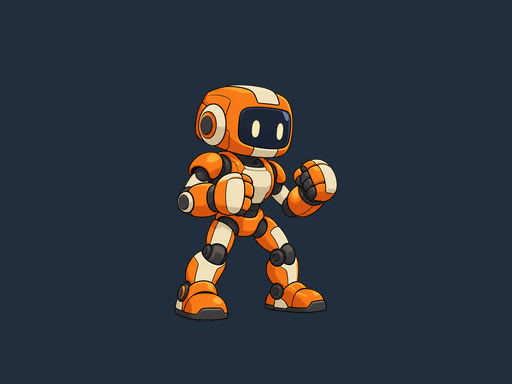
Input image
One PNG with a transparent background
Idle
35 frames · 1.46 s loop
Run
16 frames · 0.67 s loop
Jump
77 frames · two jumps in 3.2 s
Punch
36 frames · 1.5 s
Kick
31 frames · 1.29 s
Any 2D style
Painted, pixel art, and creature characters
The motion follows the art you upload. Each of these started from a different project-owned character image.
Watercolor walk
Painted character · side view
Animate a transparent PNGPixel art sword slash
Pixel art · attack
Animate pixel artForest deer trot
Hand-painted creature · loop
Export character spritesHow it works
From a still character to a moving one
You describe the motion; the model generates it; you decide which frames to keep.
- 1
Upload one character image
A full-body character with a clear silhouette works best. A PNG with transparency keeps the background clean.
- 2
Describe the action
Say what the character does, which way it faces, and whether it should stay in place or loop.
- 3
Generate a preview
Pick a model, length, and resolution. The app shows the credit cost before you start; a 4-second 480p clip on Seedance 2.0 Fast used 36 credits.
- 4
Trim and export
Step through the frames, keep the clean range, and export a video, GIF, PNG frames, a sprite sheet, or an engine pack.
Export
Take the animation where you need it
On the free plan
- Download the generated video
- Export a GIF
- Export a PNG frame sequence, including transparent frames
With a subscription or credit pack
- Sprite sheets with JSON frame data
- Packs for Unity, Godot 4, Unreal Paper2D, Cocos Creator, and Construct 3
- WebM Alpha and ProRes 4444 with real transparency
- Commercial use of what you export
Better results
Tips for clean character animation
- Use one character per image, full body in view, facing the direction you want.
- Keep arms and legs readable against the body; overlapping limbs are harder to animate cleanly.
- Leave empty space around the character for jumps and big swings, or add it with Expand canvas.
- Ask for in-place motion for game loops so the character doesn't travel across the frame.
- Generate one action per clip, or plan two clear actions in one clip and cut them apart.
What it doesn't do
- It doesn't lip-sync or make a character talk from audio.
- It doesn't design a character from a text prompt; start from your own image.
- It outputs 2D video and frames, not a 3D rig or skeleton.
- Results vary with the image, prompt, and model, so review each preview before you export.
Character animation questions
How do I animate a character from an image?
Upload the image, describe the action, and generate a preview. Then trim the clean part and export it. Each clip is one image-to-video generation, so if the motion isn't right you can change the prompt and try again.
Can I animate characters for free?
After verification, eligible new accounts receive 120 welcome credits, valid for 7 days. That covers about three 4-second 480p clips on Seedance 2.0 Fast. GIF and PNG frame exports are free; other formats and commercial use need a subscription or a credit pack.
Can I animate a drawing or a hand-drawn character?
Yes, if the drawing shows one character with a clear outline, like the painted examples above. Photograph or scan it on a plain background and crop to the character. Rough sketches and crowded scenes give less predictable motion.
Can AnimGen make my character talk or lip-sync?
No. AnimGen generates body motion from an image and a text prompt. It doesn't sync a mouth to audio.
Which actions can I create?
Anything you can describe for a single character: idle, walk, run, jump, attack, cast, get hit, and so on. One clear action per clip works best.
Can the background be transparent?
Yes. Start from a PNG with real transparency or use the transparent animation workflow, then export transparent PNG frames, WebM Alpha, ProRes 4444, or a sprite sheet.
Can I use the animations commercially?
Subscriptions and credit packs include commercial use. The free tier does not.
Related workflows
Bring your character to life
Create an account, upload a character image, and generate your first motion preview.
Animate your character