AI transparent animation generator from PNG

Animate a transparent PNG and export real alpha

Turn transparent character art into motion, trim the useful range, then export WebM Alpha, ProRes 4444, RGBA PNG frames, sprite sheets, or engine-ready packs.

Best for PNG or WebP artwork that already contains meaningful transparency. This is a transparent-first generation workflow, not a general video background remover.

  • Meaningful source alpha
  • WebM + ProRes 4444
  • Unity · Godot · Unreal · Cocos
Transparent PNG input
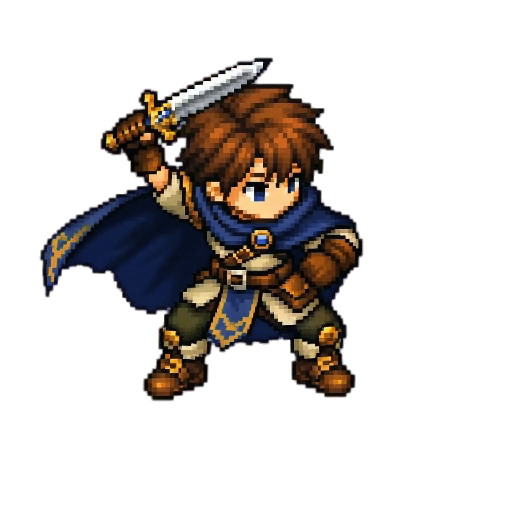
Transparent isometric tactician PNG used as an AnimGen animation input
Real RGBA result
Transparent RGBA frame from the isometric tactician slash animation shown over a checkerboard
Project-owned input and exported Alpha frame from the same transparent animation workflow.

Direct answer

Can AI animate a transparent PNG and keep the background transparent?

Yes—when the workflow starts with meaningful source alpha and finishes with an alpha-aware export. AnimGen first generates an opaque motion preview on a controlled key color, then reconstructs alpha during export. The first generated MP4 is not transparent.

Required input
PNG or WebP with meaningful alpha
Review stage
Opaque key-color motion preview
Alpha outputs
WebM, ProRes 4444, RGBA PNG, sprites and engine packs
Verified sample
512 × 512 · 4 seconds · 24 fps · 96-frame preview

Good fit

Already isolated 2D characters, game VFX, stickers, mascots, interface effects, and other artwork that must remain compositable.

Different task

Removing an unknown or complex background from finished footage. That is arbitrary video background removal, not this transparent-first workflow.

PNG to transparent video

One clear path from source alpha to animated alpha

The colored middle stage is intentional. It gives the export pipeline a known background to remove consistently after you have reviewed and trimmed the motion.

Workflow illustration
1 · Transparent PNG inputRGBA PNG
Transparent isometric pixel-art tactician PNG shown over a checkerboard

Start with real alpha

A visible subject and meaningful transparent area are required for Transparent animation mode.

2 · Generation preview4 s · 24 fps
This preview is not the transparent deliverable.

Review motion on a key color

The four-second slash preview stays opaque on a temporary solid background so the motion can be reviewed.

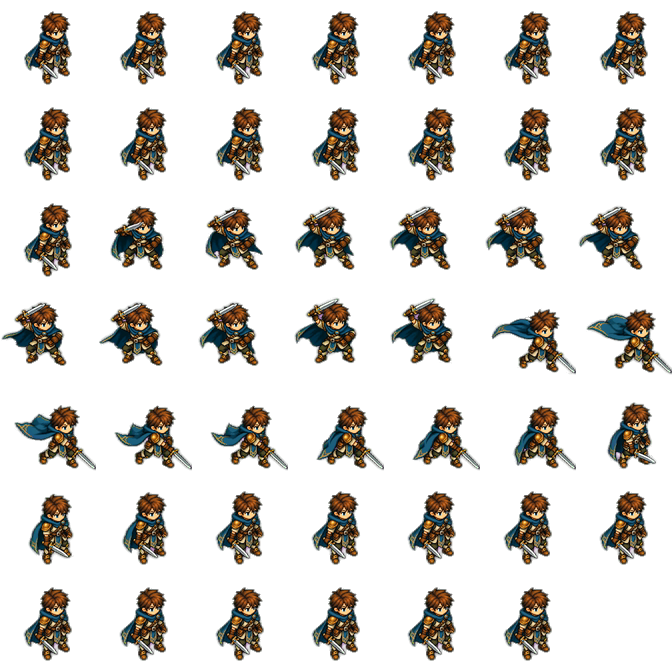
3 · Transparent export48 frames
Forty-eight-frame transparent sprite sheet for an isometric sword-slash animation

Create the alpha deliverable

The slash is sampled into 48 transparent frames and packed for a game-asset workflow.

How it works

A transparent-first image animation workflow

Transparency is a deliberate mode choice, not an assumption made from every uploaded image. You stay in control of both the generation mode and the final export.

  1. 1

    Upload a transparent PNG

    Use isolated character or effect artwork with meaningful alpha, a readable silhouette, and room for the planned motion.

  2. 2

    Choose Transparent animation

    AnimGen validates the alpha input and prepares a controlled key-color background for the selected video model.

  3. 3

    Generate and review

    Inspect the opaque, colored-background preview for motion quality, consistency, framing, and a useful loop range.

  4. 4

    Trim and export alpha

    Select the clean interval, then create a transparent video, PNG frames, sprite sheet, or engine-ready package.

Temporary preview background

This preview is not the transparent deliverable.

Why the preview has a color

The key background is temporary—and intentional

The video models used by this workflow return ordinary opaque video. Transparent animation therefore generates motion on a controlled solid color. AnimGen uses that known color only during export, where temporal cleanup, edge refinement, despill, and RGB edge extension reconstruct the alpha result.

  • Green or magenta in the generated video is an expected processing stage.
  • Choose and trim the useful motion while viewing the opaque preview.
  • Transparency appears in the alpha-enabled files created by export.
  • Always inspect difficult hair, glow, blur, and fast-motion edges before production use.

Two explicit modes

Choose creative background freedom or a transparent-first contract

A transparent upload does not silently force one behavior. Standard animation leaves background decisions to the source, prompt, and model; Transparent animation is a strong request for isolated alpha output.

Flexible

Standard image animation

Use when the scene or background may be part of the creative result.

  • Accepts opaque or transparent source images
  • The prompt may describe a new environment
  • The model can preserve, change, or invent a background
  • Does not promise a transparent video deliverable
Transparent-first

Transparent animation

Use when the character or effect must remain isolated for compositing or a game engine.

  • Requires a PNG with meaningful alpha
  • Uses a controlled temporary key background
  • Unlocks Transparent WebM and ProRes 4444 exports
  • Also supports transparent frames and sprite assets

Alpha export formats

Deliver the same motion to web, editing, and game pipelines

Select the useful range first, then choose one or more outputs. Playback and alpha support vary by browser, editor, and engine, so validate the exported file in its destination.

Transparent WebM

An alpha-enabled video for compatible browser, runtime, and compositing workflows.

ProRes 4444 MOV

A high-quality alpha video for motion graphics, editing, and professional compositing tools.

Transparent PNG frames

Individual RGBA images when your engine or art pipeline needs direct access to every frame.

Sprite sheets and engine packs

Package transparent frames with JSON metadata or export for Unity, Godot, Unreal Paper2D, and Cocos Creator.

Choose the destination

Export the format your production workflow actually needs

Free PNG frames let you inspect the Alpha result. Paid credits unlock production video formats, sprite metadata, engine packages, and commercial use.

DestinationRecommended outputWhat you receiveAccess
Web and compatible runtimesTransparent WebMCompact alpha-enabled video for compatible playback and compositing workflows.Paid · commercial use
Editing and compositingProRes 4444 MOVHigh-quality Alpha video for professional editing and motion-graphics tools.Paid · commercial use
Frame inspectionRGBA PNG frames ZIPIndividual transparent images with direct access to every selected frame.Free tier · no commercial use
Reusable 2D animationSprite sheet + JSONPacked transparent frames with machine-readable frame rectangles and timing.Paid · commercial use
UnityUnity PackSprite sheet, importer metadata, JSON, manifest, and setup instructions.Paid · commercial use
Godot 4Godot 4 PackSpriteFrames resource, AnimatedSprite2D scene, manifest, and source texture.Paid · commercial use
Unreal / CocosPaper2D or Cocos PackEngine-specific import data, transparent texture, manifest, and instructions.Paid · commercial use
RGBA frame on checkerboard
Transparent tactician slash frame displayed on a checkerboard to reveal its Alpha channel

Downloadable proof

Inspect real RGBA frames and engine packages

These project-owned tutorial files let you verify transparency, frame alignment, metadata, and engine import structure before using AnimGen with your own artwork.

Sample downloads are provided for compatibility testing. Export access and commercial rights for your own animations follow the current plan or Credit Pack entitlements.

Isometric slash presentation preview4 s · 24 fps

Inspect the result

Check transparent motion against a visible background

This project-owned isometric slash animation is rendered over a checkerboard from the exported RGBA frame sequence. The presentation MP4 makes the motion easy to inspect; the downloadable PNG sample preserves the actual Alpha channel.

  • Review the full idle-to-slash-to-idle motion at its intended playback speed.
  • Switch between light and dark test backgrounds in the destination tool.
  • Check the sword arc, cape, hair, and fast-moving edge detail carefully.
  • Keep the ProRes 4444 source so you can revise the selected interval or export settings.
WebM AlphaProRes 4444RGBA PNGSprite + JSON

Transparent background animation questions

Why does the generated video have a green or magenta background?

That color is the temporary key background used by Transparent animation mode. The generated preview is intentionally opaque so you can review the motion. AnimGen creates alpha when you run the export step.

Is the first generated video already transparent?

No. The initial video is a reviewable, opaque model result. Transparent WebM, ProRes 4444 MOV, PNG frames, and sprite assets are separate deliverables created during export.

Do I need to upload a transparent PNG?

Yes for Transparent animation mode. The image must contain meaningful alpha rather than only an unused alpha channel. Standard image animation can still use either opaque or transparent images.

What happens if I upload a transparent PNG but choose Standard animation?

AnimGen does not force a white background or a transparent result. The model keeps creative freedom to follow the image and prompt, including any background you describe.

Which transparent video format should I choose?

Use Transparent WebM for compatible web or runtime pipelines and ProRes 4444 MOV for high-quality editing and compositing. Use PNG frames or a sprite sheet when your game engine works with image assets instead of alpha video.

Is this the same as removing the background from any video?

No. This page describes a transparent-first workflow that begins with known alpha and a controlled generation background. Arbitrary footage background removal is a different and less predictable process.

Create motion without giving up the transparent workflow

Upload a transparent character PNG, choose Transparent animation, review the key-color preview, and export the alpha format your project needs.

Start a transparent animation