
In this guide
A character can look convincing in an AI preview and still need work before it fits a game. A run might start with a standing pose. A sword can disappear halfway through an attack. A transparent export can preserve the character while changing the pixel style you wanted to keep.
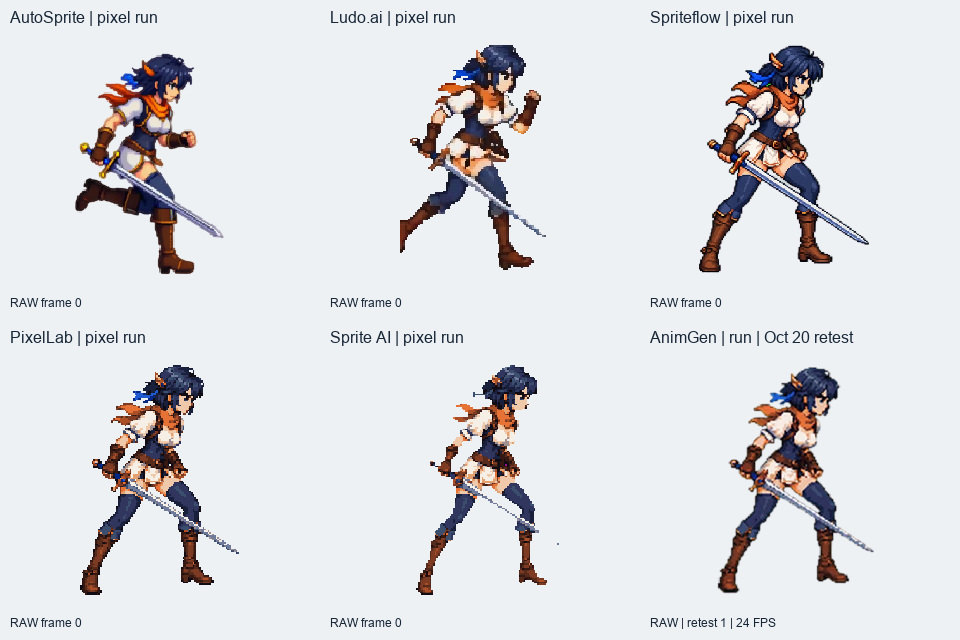
We tested AutoSprite, Ludo.ai, Spriteflow, PixelLab, Sprite AI and AnimGen with the same pixel-art swordswoman, asking for an idle, an in-place run and one sword slash. Four tools also received the same painted orange robot. PixelLab and Ludo's Forge Pixel output stayed closest to a small-pixel workflow; the robot results gave us more room to compare broader movement and frame selection.
We are the AnimGen team. The first tests ran on October 17–18, 2026. We repeated AnimGen's three swordswoman tasks on October 20, after fixing an input-framing problem, and used Expand Canvas for the run and attack. Those new results are labeled in the videos; the other tools were not retested. The original outputs and all failed-attempt costs remain in the test record.
The comparison covers 30 character-and-action tasks. Retro Diffusion was on the original seven-tool shortlist but was skipped while the applicability of its evaluation-use terms remained unresolved. It has no score here.
How we tested the same character
The shared input was a 96 × 139 transparent PNG with 16 visible colors, facing right at a three-quarter angle and holding a long sword. The supplementary robot was a 1254 × 1254 transparent PNG. Both are our own artwork. Every tool accepted its assigned original image without a locally redrawn substitute.
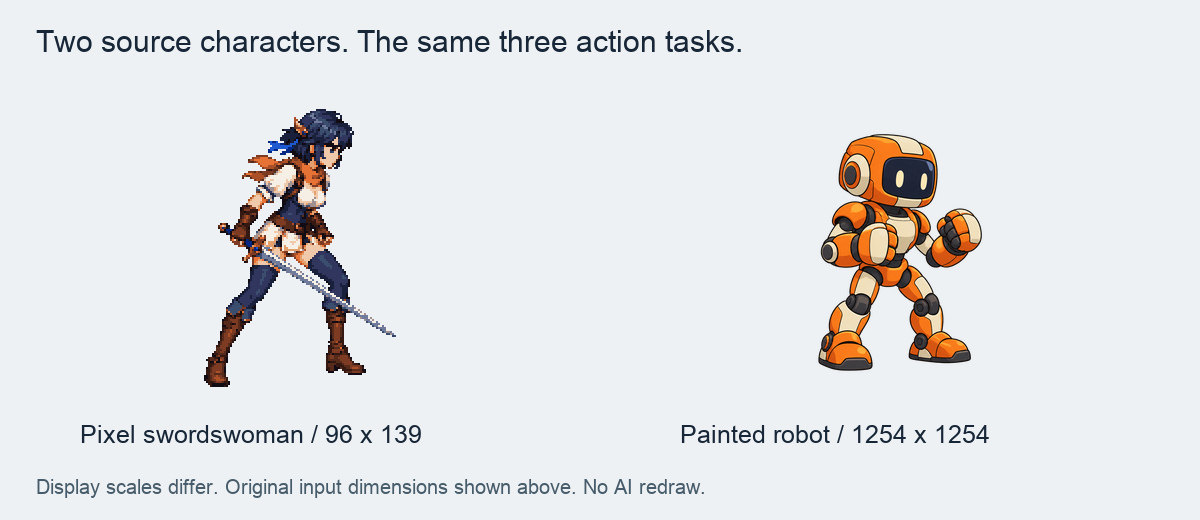
The sword already sits close to the edge of the small input. That made room for movement a real constraint. AutoSprite used Auto Padding; Ludo used Auto Margin and True Size for the pixel character. In AnimGen's October 20 retest, the idle used adaptive framing without Expand Canvas, the run used a square canvas at 67% subject scale, and the attack used a wide canvas at 50% scale with the character left of center. Framing choices are part of these workflows, so the videos do not isolate model quality.
Actions, settings and attempt limits
These were the six action instructions. Each was followed by a fixed instruction to preserve the character, camera angle and right-facing orientation, keep the camera fixed, and keep the whole character in frame. The pixel version also specified the same sword, pixel-art style and pixel grid.
| Character | Action | Action instruction |
|---|---|---|
| Robot | Idle | Idle fighting stance in place: subtle breathing, fists raised, feet stay planted. Make a seamless loop. |
| Robot | Run | Run in place with clear alternating strides and arm swing; the body stays in the same area of the frame. Make a seamless loop. |
| Robot | Attack | One straight punch with the right fist, then return to the guard stance. |
| Swordswoman | Idle | Idle ready stance in place: subtle breathing, hold the sword steadily in the same hand as the input, feet stay planted. Make a seamless loop. |
| Swordswoman | Run | Run in place with clear alternating strides; keep the sword in the same hand as the input and let the arms move naturally. The body stays in the same area of the frame. Make a seamless loop. |
| Swordswoman | Attack | One horizontal sword slash, holding the sword in the same hand as the input, then return to the ready stance. |
AutoSprite's first idle tests used its recommended Idle preset. Its second robot idle and the remaining actions used the written instructions. Spriteflow's Pro Mode kept its prompt-enhancement switch on and disabled; we recorded our submitted text but could not verify the internally enhanced version. PixelLab's idle text omitted one colon during editor input. The rest of the task wording was retained.
| Tool | Workflow tested | Exported frames and native timing | Files used for review |
|---|---|---|---|
| AutoSprite | 2D → Side-scroller, Turbo, requested 2 seconds; preset or custom motion | 25 frames at 12 FPS; 256 × 256 per frame | Official transparent PNG sheets; recorded player FPS |
| Ludo.ai | Forge Pixel for the swordswoman, Hydra for the robot; up to 3 seconds | 35–36 frames; 59–75 ms per frame depending on the clip; pixel frames 96 × 139 | Paid, watermark-free PNG; official JSON or GIF timing |
| Spriteflow | Pro Mode, 32 frames; looping on for idle/run | 32 frames at 8 FPS; 512 × 512 per frame | Official ZIP with PNG and manifest |
| PixelLab | Pixelorama editor, Animate with Text v3; 4/8/16 new frames requested | 6/10/18 exported frames, including two reference copies; editor default 6 FPS; 96 × 139 | PNG and native PXO project |
| Sprite AI | Custom motion, 8 frames | 8 frames at 8 FPS; 139 × 139 per frame | Official PNG and atlas JSON ZIP |
| AnimGen | Seedance 2.0 Fast, 4 seconds, 480p, automatic Alpha Key; pixel retest on October 20 | 97 frames at 24 FPS; robot 640 × 640; retested pixel idle 560 × 752, run 640 × 640, attack 864 × 496 | Source video and official transparent PNG/JSON exports |
The original two-attempt limit allowed one retry per task. Most tasks used one attempt; AutoSprite's robot idle used two. That produced 31 baseline generation attempts. AnimGen then had five additional framing experiments, followed by the three October 20 retests: 39 attempts in the complete archive. The main comparison now substitutes the dated retests for AnimGen's three original pixel results. This is an updated workflow comparison, not a claim that every tool received the same number of opportunities.
What counted as a usable candidate
We kept an animation when the character remained recognizable, the requested action was readable, the main movement was intact, and transparent frames could be played in the test scene. A loop needed a repeatable cycle; an attack needed both the strike and recovery. Small color fringes or angle changes could remain, and are described beside the result. Broken weapons or clipping through the main strike ruled a clip out.
We separated direct use, use after editing, and not selected. We assessed character consistency, motion, looping or recovery, and edges on the original output before editing. A fifth assessment recorded the preparation needed to import and play the files. The original per-attempt record and October 20 retest record contain those assessments and frame selections. We did not combine them into an overall winner score.
All 31 baseline outputs were played through the same local Godot 4.7.2 scene on macOS, using an atlas adapter and light/dark backgrounds. The 1,222 unpacked source frames matched their original RGBA pixels. The 20 original candidates were checked again after editing. The three new AnimGen clips and their three selected versions also passed that scene: 291 raw frames and 85 selected frames, with their source pixels and timing preserved. These were our own atlas imports, not tests of every vendor's native engine package.
AnimGen's new sword action is usable as a thrust, but it does not match the requested horizontal slash. We show it as an edited attack candidate and keep a stricter cost calculation that excludes it. The three borderline runs elsewhere in the test are also identified rather than silently treated as full matches.
Results side by side
The videos use a common background and proportional display size. Each tool keeps its recorded native timing. A 60 FPS comparison container repeats source images as needed; it adds no generated motion frames. The RAW panels show complete outputs before editing. AnimGen's pixel cell says “Oct 20 retest”; the other five cells retain their original first attempts. Attacks have a labeled pause between replays.
Pixel-character idle, run and attack
The long sword was the difficult part of this input. None of the original six attacks gave us a complete horizontal slash we could select. The new AnimGen clip adds a usable thrust after trimming, with both the blade and recovery inside the frame. If a horizontal slash is essential to your combat design, that remains an unmet task in this sample.
| Tool | Pixel idle | Pixel run | Pixel attack |
|---|---|---|---|
| AutoSprite | Direct | Edited | Not selected: mainly raises and lowers the sword |
| Ludo.ai | Direct | Edited, borderline | Not selected: hand and sword leave the frame |
| Spriteflow | Direct | Edited | Not selected: sword-tip clipping and residual color |
| PixelLab | Edited | Edited, borderline | Not selected: weak slash and blade damage |
| Sprite AI | Not selected | Not selected | Not selected: blade gaps in all three actions |
| AnimGen, October 20 retest | Edited breathing cycle | Edited 12-frame cycle | Edited thrust; does not meet the horizontal-slash instruction |
“Borderline” means a candidate for a looser, short-stride jogging style. Ludo's pixel run still has edge contact, and PixelLab's run remains a short-step jog after timing adjustment. The cost section shows both including and excluding these cases. A selected animation in this table is not automatically a pixel-grid-preserving one.
Painted-robot results and the effect of trimming
The robot had no thin sword to preserve and more space around its limbs. We selected all three actions from each of the four tools, using AutoSprite's second idle. Ludo's robot jog is the third borderline case.
| Tool | Robot idle | Robot run | Robot punch |
|---|---|---|---|
| AutoSprite | Direct, attempt 2 | Edited to a 7-frame cycle | Edited to one punch |
| Ludo.ai | Direct | Edited, borderline jog | Direct |
| Spriteflow | Direct | Edited to a 6-frame cycle | Edited to the first of two punches |
| AnimGen | Direct | Edited to a 15-frame cycle | Edited to remove the long extended-punch hold |
The original robot idles, original runs, and edited run comparison show the other two tasks. These robot results are unchanged from October 18. Use the visible action and the edits required to judge fit; the sample is too small for a general success-rate ranking.
What each tool did well—and what needed work
AutoSprite: check whether its perspective choices fit your game
AutoSprite asks you to choose a game perspective as well as an action. Its official product overview lists sidescroller and isometric views, preset and custom moves, and reference-video or motion-library controls. We tested 2D → Side-scroller → Turbo, with presets or custom text. The motion-reference and 3D workflows were not tested, and the internal implementation of its 2D generation was not verified.
That perspective choice matters when you already have character art. Our source robot was drawn in a three-quarter view. The first Idle preset lowered both fists into a relaxed stance. The second attempt used our full fighting-idle instruction, including a request to keep the input camera angle: it kept the fists raised, but made the body more side-on. Both characters' runs also changed viewing angle during the motion. Selecting a shorter cycle retained some of that rocking. You can see it in the original robot idles and runs.
For a new sidescroller prototype, a recognizable side-facing character and a readable stride can be a useful starting point. AutoSprite accepted both original images, returned regular transparent 5 × 5 sheets, and gave us a short repeatable running cycle for each character. If the output perspective suits the game, those results leave relatively little file preparation before trying them in a scene.
For an existing three-quarter-view character set, the same angle change can mean extra art work. A run that turns the torso away from the idle may look inconsistent when the game switches states. The visible weapon reach and foot placement may also need checking against the existing assets. The runs here were selected as animation candidates; adding them to an existing set still depends on matching its perspective. A project that must preserve the input perspective should test idle-to-run transitions early; the fixed-angle text instruction did not prevent the changes in this batch. These observations concern our Side-scroller samples; the other perspective modes were not tested.
We counted both robot-idle attempts and both unlocks. The punch output repeated the action twice; frames 3–12 supplied one strike and recovery. The sword attack mostly raised and lowered the weapon rather than making the requested slash.
Its Turbo output also redrew the pixel character at 256 × 256 with smooth shading and mixed colors. That can work as a different visual treatment, but it does not preserve the original 96 × 139 pixel grid. Check the perspective and pixel treatment together before generating a full move set.
Ludo.ai: useful pixel-size control and a clean robot punch
Ludo's Forge Pixel / True Size combination kept the swordswoman at 96 × 139 with hard transparent edges. The idle remained recognizable, and the Hydra robot punch gave us one clear strike followed by a return to guard without selecting a shorter action.
True Size also kept the limited canvas around the sword. Parts of the pixel run reached the edge, and the hand and blade left the frame during the attack. The robot's running motion was closer to a small-step jog, with changes in body angle. We kept that as a borderline candidate after a 25% playback-speed increase.
Free exports carried a watermark across the frames. After upgrading to Indie, we downloaded the existing results again through the official export controls without generating them again. That behavior matches Ludo's sprite-generator documentation. The original watermarked files remained outside the visual-quality comparison.
Spriteflow: consistent standing poses and explicit export timing
Spriteflow's Pro Mode produced 512 × 512 frames with a manifest specifying 8 FPS. The character identity and standing poses were generally stable, and the downloaded package supplied the timing needed to reproduce playback without guessing from a preview.
The robot punch repeated twice despite Loop being off; we kept frames 4–13 for one action. The runs needed their standing head and tail sections removed. The pixel run retained some green residue and soft leg detail, while the sword attack clipped the blade at the right edge. Those flaws remain visible in the original comparison.
The pixel input became a smoothly shaded, higher-resolution character. Consider that workflow when the painted appearance fits the project; it would require further work to match a strict low-resolution pixel-art set.
PixelLab: small native pixels and an editable project
PixelLab was the most direct fit here for continuing work in a low-resolution pixel editor. Its v3 workflow returned 96 × 139 frames with binary transparency, and we retained the native Pixelorama project as well as the PNG sheets. We completed the tests through the official editor's trial route; the separate Creator animation page showed a paid restriction. The v3 documentation describes the editor workflow.
The exports included two copies of the input before the generated frames. Removing those left four idle frames and eight running frames. We kept the idle at the editor's default 6 FPS and changed the run to 12 FPS. The run was still a short-step jog, so it stays in the borderline group.
The blade was less reliable than the body. The attack lifted the sword toward horizontal and returned, with weak slash motion and damaged fine detail. Making that attack usable would require more than trimming reference frames. The generated colors also went beyond the input's 16-color palette.
Sprite AI: compact output, with fragile weapon detail in this sample
Sprite AI returned eight-frame sheets with explicit 125 ms frame durations, binary transparency and a compact pixel-art appearance. The visible body movement was readable, and all three complete exports kept the character inside the frame.
The thin blade broke into gaps or became an incomplete line in the idle, run and attack. We checked it against both light and dark backgrounds; it was not simply a pale blade disappearing against white. We did not select any of these three outputs, because repairing the weapon would require drawing into the frames.
That leaves a useful distinction: the files were easy to parse and play, while this character's weapon detail failed our visual criterion. We did not test a broader set of characters or use additional attempts to establish how often that happens.
AnimGen: continuous 24 FPS motion, with room to select a shorter action
AnimGen's robot stayed recognizable through continuous 24 FPS motion. Its video-first workflow supplied enough frames to choose a run cycle and adjust the punch's timing by removing holds. We selected a 15-frame run and a 25-frame punch; the original idle could be used directly.
The October 20 swordswoman retest retained her white shirt and recognizable proportions. The run showed alternating strides while keeping the sword inside the expanded square canvas. We selected a 12-frame cycle. The attack kept the weapon inside a wide canvas and returned to the ready pose; trimming the long holds produced a shorter, usable thrust.
There are still tradeoffs. The thrust does not follow the horizontal-slash instruction, and hands and feet show some motion ghosts and mixed colors. The larger video-derived frames do not preserve the input's pixel grid. The idle's framing remains tight; the run and attack benefit from deliberately leaving space around the character.
AnimGen fits this test best when continuous movement and choosing frames from a longer clip matter more than a strict low-resolution grid. It does not currently create a character from text or generate a coordinated multi-direction view set. Its character-animation workflow and sprite-sheet export guide cover the steps after supplying an image.
Pixel art: canvas size, hard edges and palette are separate checks
Ludo's pixel workflow and PixelLab kept the original frame dimensions. Sprite AI used a square 139 × 139 frame and retained a compact pixel appearance. AutoSprite, Spriteflow and AnimGen produced larger, smoother interpretations in the modes we tested.
| Tested workflow | Frame dimensions | Transparency | Pixel-grid observation |
|---|---|---|---|
| AutoSprite Turbo | 256 × 256 | Includes soft Alpha edges | Repainted, smoothed appearance |
| Ludo Forge Pixel / True Size | 96 × 139 | Hard Alpha in the PNG exports | Small-pixel appearance retained; individual colors and details changed |
| Spriteflow Pro | 512 × 512 | Includes soft Alpha edges | Smooth, high-resolution redraw |
| PixelLab v3 | 96 × 139 | Hard Alpha | Native low-resolution grid retained; palette expanded |
| Sprite AI Custom | 139 × 139 | Hard Alpha | Compact pixel appearance; thin sword detail broke |
| AnimGen / Seedance 2.0 Fast, October 20 | 560 × 752 idle; 640 × 640 run; 864 × 496 attack | Includes soft Alpha edges | Video-derived mixed colors; original grid not preserved |
Matching dimensions alone does not lock the palette or stop a sword from changing shape. PixelLab's new frames had 36–46 visible colors in this test, compared with 16 in the input. Sprite AI's frames stayed around 14–18 colors, but the blade still failed. We used color counts as supporting diagnostics, not as an animation-quality score.
If your game depends on a fixed pixel grid, inspect the sword, hands and outline at integer zoom before judging the motion at game size. A nearest-neighbor display can reveal the existing pixels; it cannot undo a high-resolution redraw.
What trimming changed, and what it could not repair
The edited comparisons preserve frame pixels and source order. We selected shorter ranges, and changed playback speed in only two cases: Ludo's robot run by 1.25× and PixelLab's run from 6 to 12 FPS. Everything else—including the October 20 clips—retained its original frame durations.
| Example | Source frames, zero-based and inclusive | Edited action |
|---|---|---|
| AutoSprite robot punch | 3–12 | 10 frames, 0.833 seconds; keeps the first punch |
| Spriteflow robot punch | 4–13 | 10 frames, 1.250 seconds; keeps the first punch |
| AnimGen robot punch | 24–33, then 63–77 | 25 frames, 1.042 seconds; removes the long hold |
| PixelLab idle | 2–5 | Four frames, 0.667 seconds; removes two input copies |
| AnimGen robot run | 16–30 | 15 frames, 0.625 seconds; keeps one cycle |
| AnimGen pixel idle, October 20 | 34–84 | 51 frames, 2.125 seconds; selects a breathing cycle |
| AnimGen pixel run, October 20 | 13–24 | 12 frames, 0.500 seconds; removes the initial ready pose |
| AnimGen pixel thrust, October 20 | 35–46, then 64–73 | 22 frames, 0.916 seconds; keeps extension and recovery |
Trimming helped when the useful movement was already present. It could not restore a missing blade or recover a strike that happened outside the image. Those clips stayed out of the shortlist. Full selections and speed multipliers are in the media evidence.
We did not reliably time all active editing work. Script encoding times are recorded, but exclude reviewing frames, choosing cuts and preparing the engine scene. They cannot support a claim about which tool took the least human work.
AnimGen's retest: framing, movement space and attack timing
The original AnimGen run and attack clipped the character or sword. Investigation found that the old input-framing path cropped this tall image when fitting the provider's dimensions. After that was fixed, we generated each swordswoman action once more with the original action prompts. This retest also used Expand Canvas for movement space: 67% subject scale on a square canvas for running, and 50% scale at 35% horizontal position on a wide canvas for the attack.
All 97 frames of the new run and all 97 frames of the new attack stayed inside the frame. The idle retained the tight original composition, with the boots against the bottom edge. Edge contact alone is not evidence that a limb was cut off.
The complete attack waits before striking and holds the extended sword for nearly a second. We kept frames 35–46 and 64–73: the transition into the attack, the thrust and its trail, a brief hold, and the return to ready. The resulting 22 frames last 0.916 seconds, using the export's original millisecond durations. No sword pixels were repaired or generated during editing.
The retained original attack comparison and earlier canvas experiments remain available. The October 20 batch used 108 credits, with no export charge. It replaces the old pixel batch for the current-version cost comparison below. The superseded version's eight generations and framing experiments remain in the historical record, outside that calculation. The other tools were not retested, so these results do not establish an equal-opportunity win rate.
Cost per usable animation
Credits have different prices on each platform. We therefore compare estimated US-dollar costs using the entry-level monthly plans listed below, assuming the included allowance is fully used. These are plan-allocation estimates, not audited charges to our test accounts. Free credits, annual discounts and account-specific offers do not reduce the main paid estimates.
For example, AnimGen's Basic plan lists $9.99 for 1,100 credits. One 36-credit generation in the new batch allocates 36 ÷ 1,100 × $9.99 ≈ $0.33, including the zero-credit export observed in this test. The one-time $4.99/500-credit pack allocates about $0.36 to the same generation. The amount paid at checkout is still the whole plan or pack price. AnimGen pricing.
Cost per selected action = net generation and export units in the evaluated batch × the listed plan's unit price ÷ selected actions. Each task contributes at most one result. Failed attempts and retries within that batch remain included, such as AutoSprite's first robot idle. AnimGen's pixel row uses only the three October 20 generations after the framing fix; the superseded version's tests are excluded, not treated as refunded. The other tools use their October 17–18 batches. Raw consumption, exclusions and formulas are in the dollar-cost calculation record.
Pixel-character costs in US dollars
| Tool | Estimated batch cost | Selected actions out of 3 | Estimated cost per selected action | Excluding borderline runs or action mismatch |
|---|---|---|---|---|
| AutoSprite | $0.36 | 2 | $0.18 | $0.18 |
| Ludo.ai | About $1.08 | 2 | About $0.54 | About $1.08; idle only |
| Spriteflow | $2.99 | 2 | $1.49 | $1.49 |
| PixelLab | $0 paid in this trial; paid estimate unverified | 2 | Not estimated for paid use | Not estimated for paid use |
| Sprite AI | $3.36 | 0 | No usable result; undefined | Same |
| AnimGen, October 20 fixed-version batch | $0.98 | 3, including the thrust variant | $0.33 | $0.49; idle and run only |
AnimGen's $0.33 includes the accepted thrust variant; requiring the exact horizontal slash leaves two selected actions and raises the allocation to $0.49. Ludo's pixel total uses quoted consumption because the balance display did not expose every fractional debit. PixelLab used seven trial generation units and required no payment; we have not verified the equivalent paid v3 allowance consumption, so it does not receive a paid per-action estimate.
AutoSprite's estimate uses Starter's unlimited unlocks. The $5 pack we actually purchased has both a credit limit and a five-unlock limit; its costs cannot be reproduced by dividing $5 by 100 credits alone. For each tool, the dollar estimate still refers to the output size, timing and motion shown above, not an identical number of animation seconds or pixels.
Supplementary robot costs in US dollars
| Tool | Estimated batch cost | Selected actions out of 3 | Estimated cost per selected action | Excluding borderline runs |
|---|---|---|---|---|
| AutoSprite | $0.48 | 3 | $0.16 | $0.16 |
| Ludo.ai | $2.16 | 3 | $0.72 | $1.08; idle and punch |
| Spriteflow | $2.99 | 3 | $1.00 | $1.00 |
| AnimGen | $0.98 | 3 | $0.33 | $0.33 |
These are the original robot batches, including AutoSprite's idle retry. Calculations use unrounded values; the displayed batch total is rounded separately from the per-action result.
Plan assumptions and the amount you need to pay upfront
The sources below were recorded during October 16–20. The main comparison uses public entry-level monthly prices, with Spriteflow's standard price rather than our account-specific discount. Prices and allowances can change; checkout remains authoritative. Monthly plans recur, while the identified packs are one-time purchases. Taxes and human editing time are not included.
| Tool | Plan used for the dollar estimate | Purchase threshold and other options observed |
|---|---|---|
| AutoSprite pricing | Starter: $12/month, 500 credits, unlimited unlocks | $12 for a month, or the recorded one-time $5 pack with 100 credits and five unlocks. The free unlock allowance ran out during our test |
| Ludo.ai pricing | Indie: $20/month, 250 credits | $20 monthly for the watermark-free workflow tested. The $15/month annual equivalent requires $180 upfront |
| Spriteflow pricing | Starter standard monthly price: $19.90, 200 credits | $19.90 at the standard monthly price. Our account showed a $14.90 purchase offer; the renewal price was not verified. Free generation did not unlock the official download |
| PixelLab | No paid conversion for this trial | $0 paid; PNG/PXO exports worked. Tier 1's recorded first-month offer was $12, not a verified recurring price |
| Sprite AI pricing | Creator: $8/month, 100 Tokens | $8 monthly; the three samples were generated during paid access |
| AnimGen pricing | Basic: $9.99/month, 1,100 credits; all export formats | $9.99 monthly, or $4.99 once for 500 credits with export access valid for 365 days. No new-account trial was used here |
At Spriteflow's recorded $14.90 account offer, the allocations would instead be about $1.12 per selected pixel action and $0.75 per robot action. That discount is shown separately so an account-specific offer is not silently compared with everyone else's public price.
If you buy an AnimGen pack, make only these three animations and never use the remaining credits, you still pay $4.99, not the roughly $1.08 allocated to the consumed credits. The same distinction applies to unused monthly allowances elsewhere. For production budgeting, add the time spent reviewing, selecting frames, repairing details and checking playback in your game.
Choose a tool around the asset you need
For a small-pixel character you intend to edit, start by comparing PixelLab's native editor workflow and Ludo's Forge Pixel / True Size output. Inspect thin weapons early and leave room for the intended motion. Sprite AI is also worth testing on your own subject if compact output matters, but this swordswoman's blade prevented us from selecting its results.
For a painted character with broader motion, compare the robot videos. AutoSprite supplied readable strides with short sheets; Ludo supplied a clean single punch; Spriteflow supplied stable standing poses and explicit timing; AnimGen supplied continuous 24 FPS footage from which we could select shorter actions. Use the style and the work required in your project to narrow that list.
For directional character sets, this test gives no winner. PixelLab's official feature page lists four- and eight-direction views, and Ludo describes a separate directional-sprite workflow. We did not test those features. A tool's success with one right-facing input does not establish a consistent eight-direction set.
Take one of your own characters and test its most demanding action before committing to a subscription. Check the downloaded frames, both background colors, native timing and the import into your game. If you are starting with painted artwork, AnimGen's image-to-sprite workflow can generate the motion, and the free sprite-sheet maker can pack frames you already have. Our Godot import example provides a small scene for the final playback check.