In this guide
An MCP animation task is not finished when an AI assistant says “the job is queued” or returns a temporary link. A useful end-to-end workflow has to move the real image bytes, show the cost before generation, wait for a terminal result, save every requested file, and inspect the downloaded pixels.
This guide records one production AnimGen MCP run completed with Codex on September 11, 2026. We started with a transparent character PNG and received a source video, sprite sheet, and JSON metadata. Visual review then caught an aspect-ratio defect in the first sprite sheet, so the public sample uses a corrected re-export from the exact same downloaded MP4. No second model generation or extra credits were used. You can download the complete evidence package and inspect the final files.
The result at a glance
| Item | Observed in this run |
|---|---|
| MCP client | Codex desktop, connected to the production AnimGen remote server with OAuth |
| Input | 1073 × 1466 RGBA PNG, 875,625 bytes |
| Model | Seedance 2.0 Fast, selected from the live list_models response |
| Video request | 4 seconds, 480p, adaptive ratio, automatic Alpha Key workflow |
| Export request | 16 transparent frames at 256 × 256, sprite sheet PNG plus JSON |
| Quote | 36 AnimGen credits: 36 for generation and 0 for this export |
| Final accounting | 36 charged, 0 held, 0 refunded |
| Task result | succeeded after 2 minutes 23 seconds, with no automatic paid retry |
| Production task outputs | MP4 source video, 1024 × 1024 RGBA sprite sheet, and 16-frame JSON metadata |
| Reviewed final sample | The same source MP4 and JSON, plus an aspect-corrected 1024 × 1024 sprite sheet re-exported from that MP4 |
The 36-credit amount is the historical quote for this exact run, not a permanent price. Model availability and pricing come from the live account response, so always discover and quote again before a new generation.
Start with a real transparent input

The source was the public pixel swordswoman PNG. It is a real RGBA file: its Alpha channel spans 0–255, all four corners are transparent, and roughly 27% of the canvas contains visible character pixels.
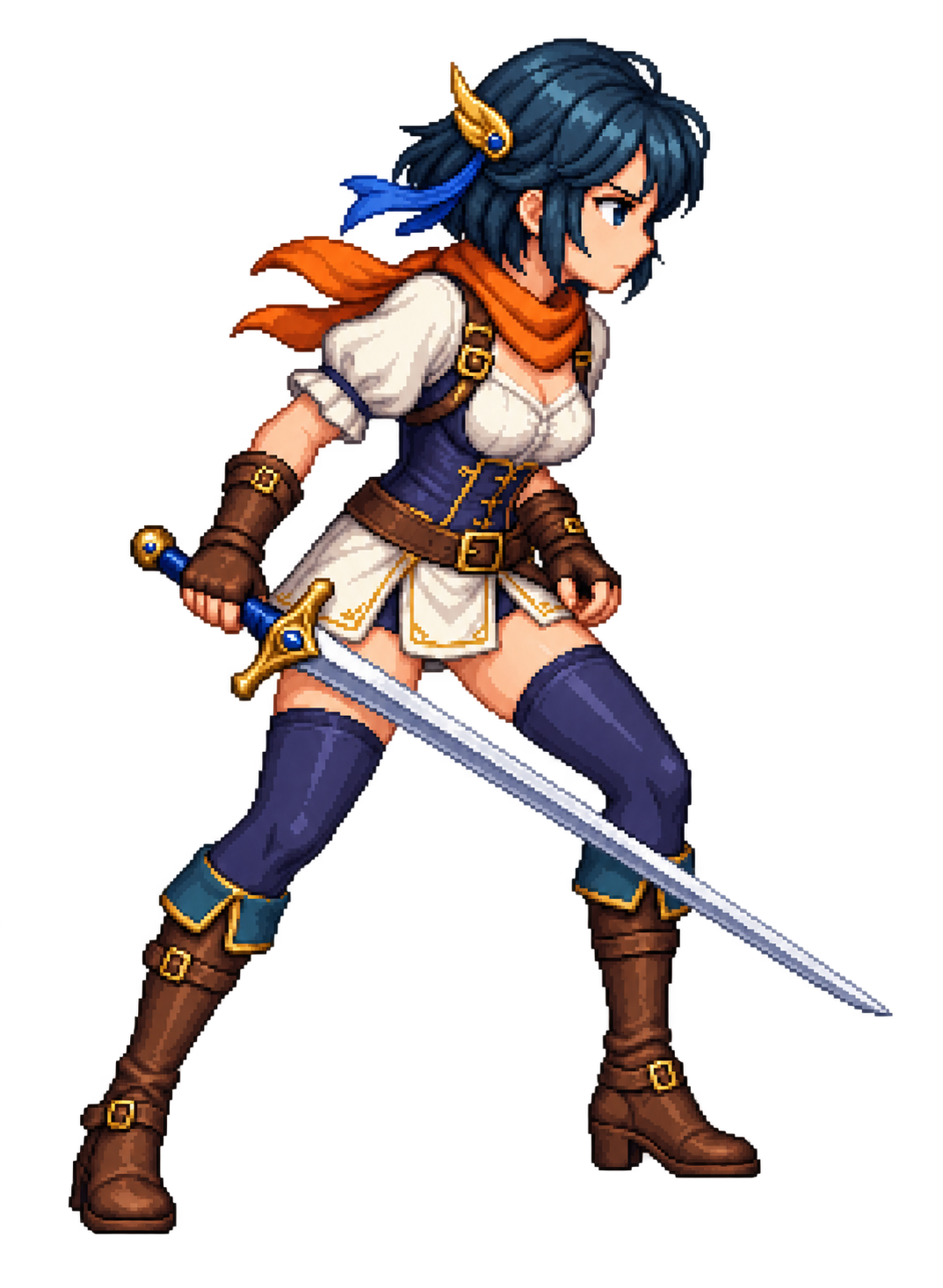
A remote MCP server cannot open a path such as ./character.png on your computer. The client has to call prepare_image_upload, transfer the exact bytes with the returned HTTP method and headers, then call complete_image_upload. Only the resulting file_id belongs in the animation request.
In this run, the completed upload reported the same 875,625-byte size and SHA-256 digest as the local source. The temporary upload URL and owned file ID were kept out of the public package.
Give the MCP client a bounded task
The most reusable starting point is a task prompt that describes both the creative result and the operational safeguards:
Use the AnimGen MCP server to turn ./character.png into a transparent,
in-place walk animation for a 2D game.

First call list_models and confirm that Seedance 2.0 Fast supports a
first-frame request at 4 seconds and 480p. Upload the actual PNG bytes;
do not treat the local path as an uploaded image.

Use automatic Alpha Key mode. Request a 16-frame transparent sprite
sheet and matching JSON metadata at 256 × 256 per frame.

Before calling generate_animation, show me the exact request and current
credit quote and wait for my approval. Do not exceed the amount I approve.
Persist one idempotency key, poll the same task to a terminal state, then
download and verify every returned asset without exposing signed URLs.
This prevents three common false finishes: assuming a local path was transferred, treating OAuth as spending approval, and reporting a signed URL without saving the file.
Connect and verify before uploading
AnimGen's production MCP endpoint is https://api.animgen.com/mcp. It uses Streamable HTTP and OAuth; an AnimGen API key does not belong in this client configuration.
For Codex CLI, the connection commands are:
codex mcp add animgen --url https://api.animgen.com/mcp
codex mcp login animgen
The official Codex MCP documentation describes remote HTTP servers and OAuth login. AnimGen's client connection guide also covers the current endpoint and other compatible clients.
After OAuth, call list_models with an empty object. A structured model list verifies read-only access without spending credits. For this test, the live response listed Seedance 2.0 Fast with first-frame input, a four-second minimum, 480p support, and the adaptive ratio used below.
Build one request and keep it unchanged
The uploaded file_id is private account data, so the public request uses a placeholder. Everything else below matches the successful run:
{
  "input": {
    "first_frame": {
      "type": "file",
      "file_id": "YOUR_COMPLETED_UPLOAD_FILE_ID"
    }
  },
  "prompt": "Static camera. The pixel-art swordswoman faces right and walks in place. Alternate the legs clearly, swing the arms naturally, and let the hair and scarf move slightly. Keep the original character design, pixel-art style, full-body framing, scale, and screen position. Do not move the camera or let the character leave the frame.",
  "video": {
    "model": "volcengine_seedance:doubao-seedance-2-0-fast-260128",
    "duration_seconds": 4,
    "resolution": "480p",
    "ratio": "adaptive",
    "transparency": {
      "mode": "alpha_key",
      "key_selection": "auto"
    }
  },
  "selection": {"mode": "full"},
  "export": {
    "frame_count": 16,
    "output_width": 256,
    "output_height": 256,
    "output_formats": ["spritesheet", "spritesheet_json"],
    "transparent": {"enabled": true}
  }
}
Both transparency settings matter. video.transparency.mode asks the video stage to use the Alpha Key workflow, while export.transparent.enabled asks the export stage for RGBA assets. Omitting one does not express the same job.
The model ID is included because it records this run. For a new task, use an ID returned by your current list_models call instead of assuming the catalog has not changed.
Quote first, then approve the paid call
We sent that request to quote_animation. It returned a 36-credit quote: all 36 credits were attributed to the four-second video generation, while the selected 16-frame export added zero credits in this run.
Only after the request and amount were shown did the user approve a maximum of 36 credits. The client then re-quoted, confirmed the amount had not increased, and called generate_animation with:
{
  "idempotency_key": "ONE_PERSISTED_LOGICAL_OPERATION_KEY",
  "quote_id": "FRESH_QUOTE_ID",
  "max_credits": 36,
  "request": {"...": "the unchanged request above"}
}
Do not copy 36 as a budget for another request. Use the price the user actually reviewed. Persist the request and idempotency key before creation; if the response becomes uncertain, recover the same task instead of silently creating another paid operation. The MCP spending safeguards describe that boundary in detail.
Poll the task, then download real bytes
generate_animation returned an asynchronous task, not an animation file. We polled that same task through video_generation and animation_export until it reached succeeded. One intermediate MP4 appeared before the two requested export assets.
For each output, the client called download_asset, used the temporary URL without forwarding OAuth or API credentials, and saved the bytes locally. No signed URL was copied into the article or archive.
| Saved asset | Measured result |
|---|---|
source-video.mp4 |
1,950,417 bytes; H.264, 560 × 752, 24 FPS, 97 frames, 4.041667 seconds |
Initial spritesheet.png |
1,005,811 bytes; 1024 × 1024 RGBA PNG; rejected after visual review because its frames were distorted |
Final spritesheet.png |
809,336 bytes; 1024 × 1024 RGBA PNG; re-exported from the same source MP4 with aspect-preserving transparent padding |
spritesheet.json |
6,790 bytes; 16 frame records, each 256 × 256 with a 253 ms duration |
The source MP4 has a solid key-color background. That is an intermediate motion asset, not the transparent deliverable.
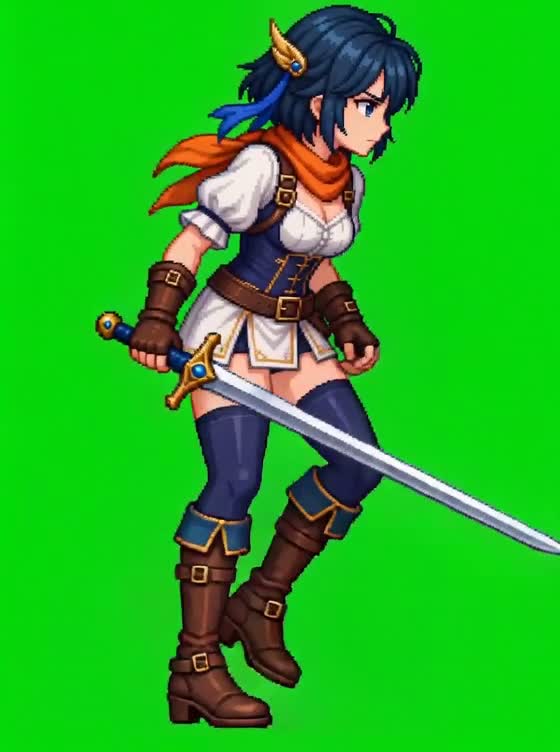
The transparency appears in the exported PNG frames:
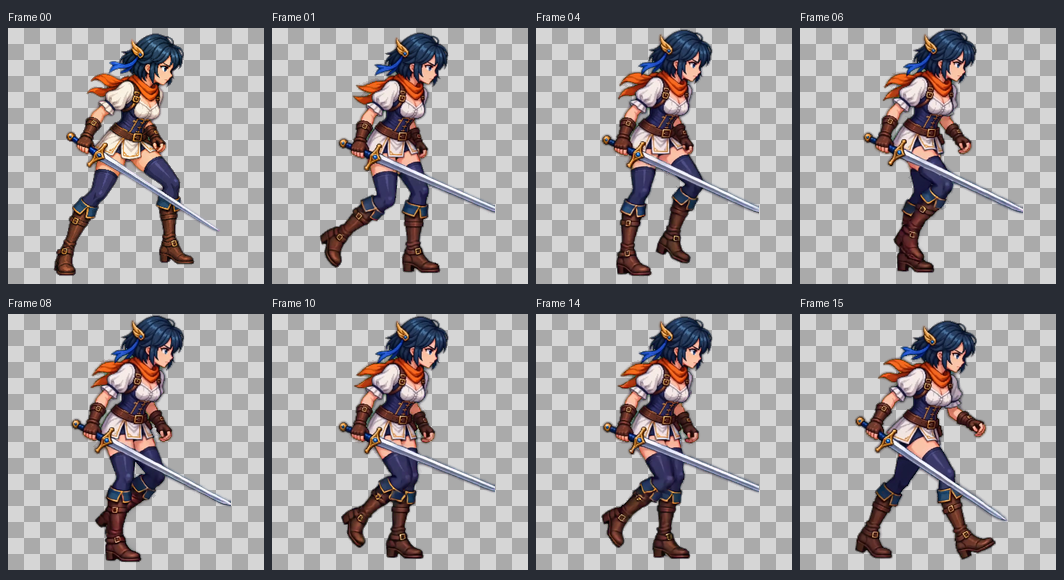
Open the animated checkerboard preview to review all 16 final frames in sequence.
Inspect the sprite sheet and JSON together
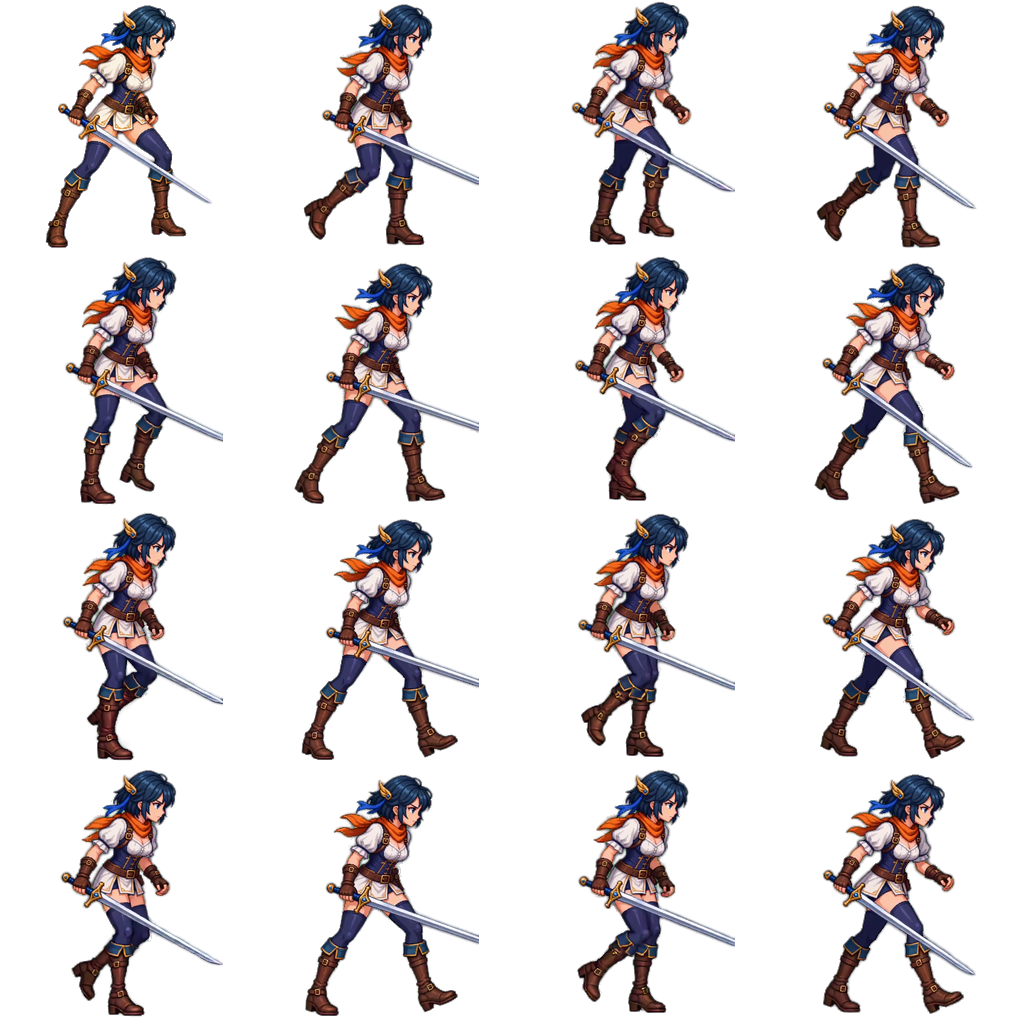
The final sheet contains a 4 × 4 grid. The JSON records the rectangle, source size, and duration for each cell, so a game or build tool does not have to infer the layout from the image.
Our file checks found:
- the three original downloads matched the byte counts in the MCP asset metadata;
- the corrected final sprite sheet was 809,336 bytes and preserved the source video's proportions;
- the PNG was RGBA and every frame contained Alpha values from 0 through 255;
- all 16 frame images were distinct;
- every sampled frame corner was fully transparent;
- all 16 JSON rectangles matched the 256 × 256 cells in the 1024 × 1024 sheet;
- JSON playback totaled 4.048 seconds, within 0.01 seconds of the generated source video;
- the task charged the approved 36 credits once, with no held balance and no paid retry.
Those checks catch transport, packaging, and obvious transparency failures. The final decision still comes from looking at the motion in its destination.
Visual review caught and fixed an aspect-ratio bug
The first export passed file, Alpha, frame-count, and JSON-layout checks, but it still looked wrong: the character was visibly too wide and too short. The source video is 560 × 752, while the export path had scaled every frame directly to 256 × 256. That made the image roughly 34% wider relative to its height. We rejected that sheet instead of using a technically valid but visually misleading result.
For the final sample, we fixed the transparent export path and re-ran only the deterministic frame export against the exact downloaded MP4. Each sampled video frame is now scaled proportionally to 191 × 256, then centered on a 256 × 256 transparent canvas with 32 pixels of padding on the left and 33 on the right. The relative aspect-ratio error is below 0.2%, and the visible pixels retain at least 33 pixels of room at the right edge.
The corrected 4 × 4 sheet still contains 16 distinct RGBA frames, every sampled corner remains fully transparent, and its JSON cell layout and 4.048-second playback duration are unchanged. Because the source video was reused, this correction required no second model call and no credits beyond the original approved 36.
AnimGen's input canvas remains useful when the character itself needs more room during generation. It is a creative framing control, though—not a substitute for preserving aspect ratio during export.
Download the sample or use the Public API
The downloadable MCP example contains the public input, exact production source MP4 and JSON metadata, corrected final sprite sheet, animated preview, frame inspection image, README, and a sanitized request template. It deliberately contains no OAuth token, signed URL, account-owned ID, quote ID, task ID, or idempotency key.
If an AI assistant is not part of your production architecture, the same kind of workflow is available through the Public API. Start with the API image-to-assets quickstart. MCP uses OAuth tools and can enforce the approved quote_id or max_credits; the API uses an API key and its own documented preflight flow, so do not mix the two authentication or spending models.
For an agent-driven workflow, follow the complete MCP generation reference. To create your own source image and inspect exports interactively first, open AnimGen Studio.