In this guide
A sprite sheet and a PNG sequence can preserve the same transparent animation, but they package it for different jobs. For a real-time 2D game, start with a sprite sheet plus metadata when the atlas fits your target hardware and your importer understands the frame rectangles. Keep or export a PNG sequence when you need to inspect, edit, replace, archive, or process frames independently.
Neither choice is automatically smaller in memory, faster in every engine, or more compatible with every device. To make the tradeoff concrete, we compared both packages from the same public AnimGen animation: 96 RGBA frames, each 512 × 512 pixels, representing a four-second tactician slash at 24 FPS.
Choose the format for the workflow stage
| Situation | Better starting choice | Why | Check before shipping |
|---|---|---|---|
| 2D engine runtime | Sprite sheet + JSON or an engine pack | One texture and explicit frame rectangles are convenient to import and batch | Maximum texture size, filtering, pivot, timing, and atlas padding |
| Frame-by-frame editing or cleanup | PNG sequence | Each frame can be opened and replaced independently | Filename order, canvas alignment, Alpha, and FPS |
| High-resolution or long animation | PNG sequence or several smaller sheets | Avoids one oversized texture | Loading strategy, file handling, and how timing is stored |
| WebGL or broad device support | A sheet that stays within a tested limit | Predictable texture assets for the target renderer | Query the actual GPU limit; do not assume desktop results apply everywhere |
| Reusable production source | PNG sequence | Portable, lossless frames can derive later packages | Preserve the README or manifest alongside the images |
The safest production workflow often keeps both: independent frames as the reviewable source, then one or more sprite sheets as target-specific runtime assets.
One animation, two real packages
The test uses the same isometric tactician slash sequence as our transparent-format comparison. Both packages contain the same 96 frame canvases in the same order. The sheet is a fixed 10 × 10 grid with 96 used cells and four unused transparent cells. Its JSON records 96 frame rectangles, each 512 × 512, and marks every entry as unrotated and untrimmed.
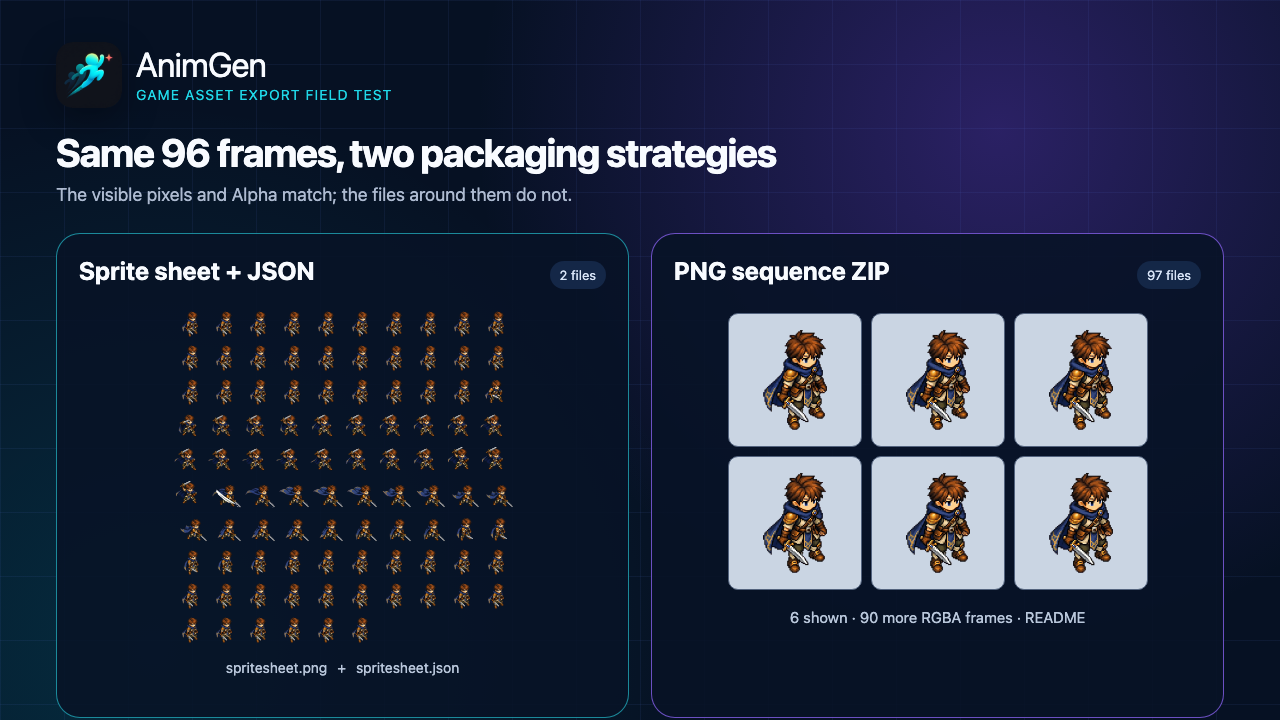
You can inspect every file used here:
- Download the 5120 × 5120 sprite sheet PNG
- Open the matching frame-layout JSON
- Download the 96-frame PNG sequence ZIP
- Open the machine-readable measurements and SHA-256 hashes
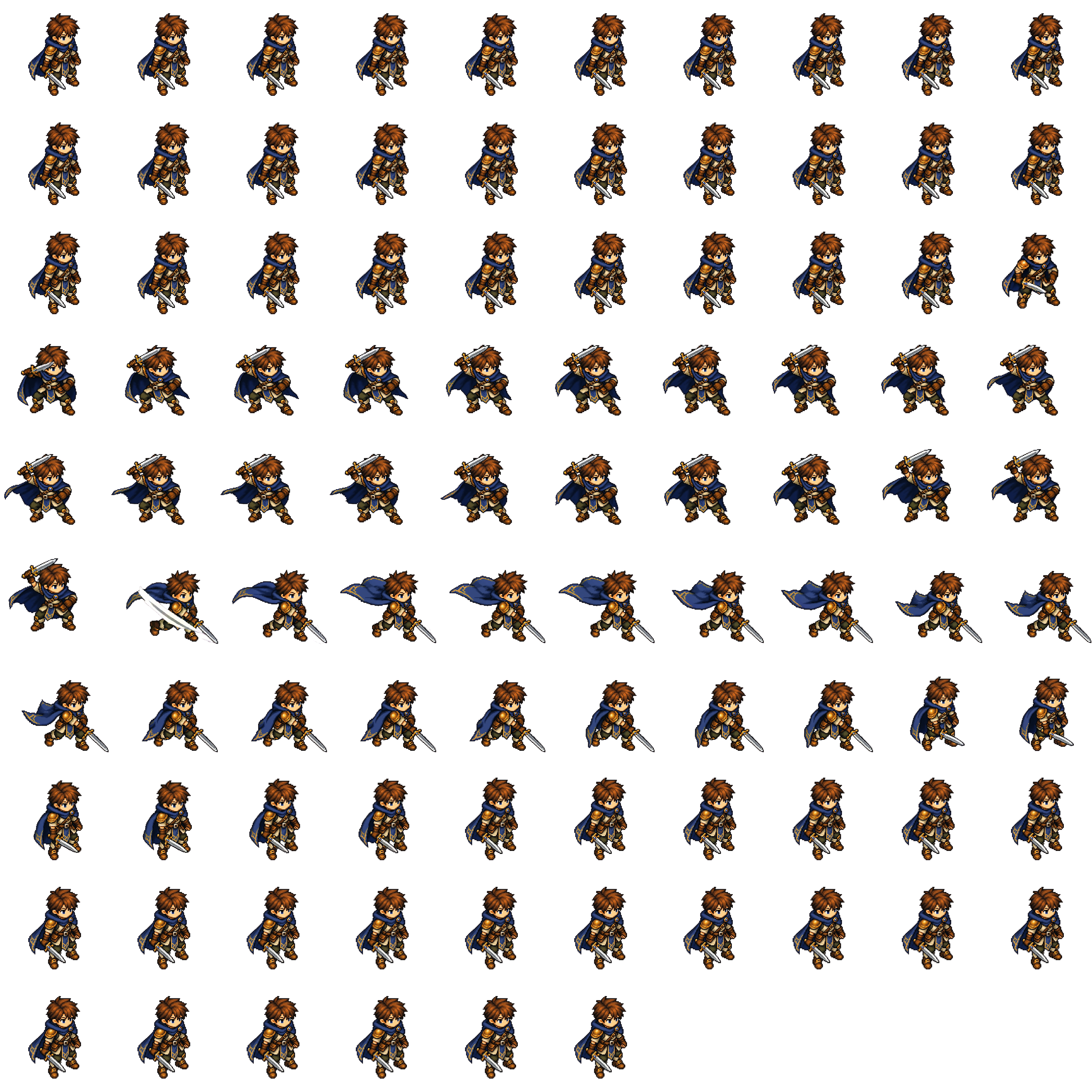
We decoded both representations before comparing them. Across all 96 frames, the Alpha values matched exactly. RGB also matched exactly wherever the source Alpha was greater than 8. Fully transparent RGB bytes were excluded because they do not change the composited image and may be normalized during packing.
That check matters: “same animation” should mean more than similar thumbnails. It confirms that this comparison is about packaging, not two visually different exports.
Measured download size and file count
For this sample, the downloadable packages are:
| Package | Files after opening | Exact bytes | Approximate size |
|---|---|---|---|
| Sprite sheet PNG + JSON | 2 | 6,573,057 | 6.27 MiB |
| PNG sequence ZIP | 97 | 14,427,494 | 13.76 MiB |
The sequence ZIP contains 96 PNG frames plus one README. Its entries total 14,550,491 uncompressed bytes; ZIP compression reduces the stored payload by only about 0.9% because each PNG is already compressed. The sheet package is 54.44% smaller than the ZIP in this one test.
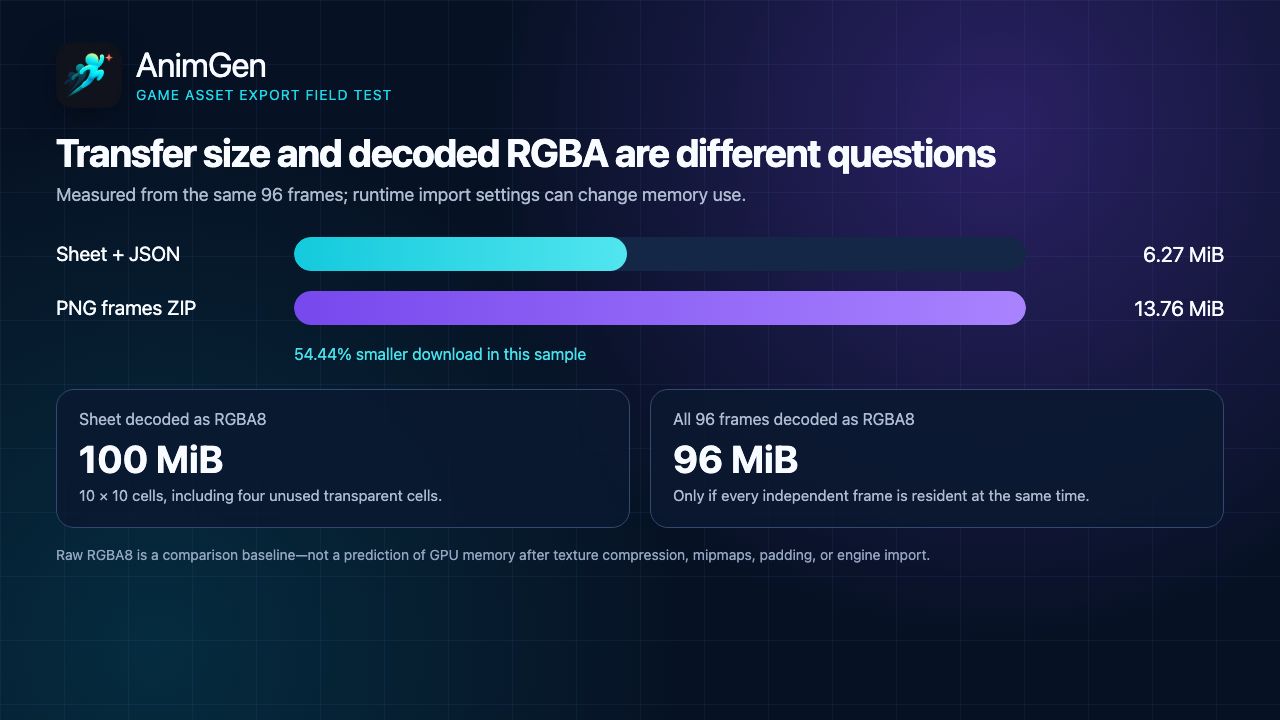
This is not a universal sprite-sheet compression ratio. The result changes with transparent area, repeated pixels, image detail, frame dimensions, grid layout, PNG encoder, and ZIP settings. A tightly packed sheet can compress repeated empty or similar regions efficiently; a different animation can produce a different result.
Also note that the ZIP is one network download even though it expands into 97 files. “Many files” affects extraction, version control, editor workflows, and runtime handling; it does not necessarily mean 97 HTTP requests when the sequence is delivered as an archive.
A smaller download does not guarantee lower memory use
PNG file size describes compressed storage or transfer. A renderer normally decodes pixels before using them, and an engine may then apply platform texture compression, mipmaps, padding, or a different internal format.
As a simple RGBA8 baseline:
- the 5120 × 5120 sheet contains 26,214,400 pixels, or exactly 100 MiB at four bytes per pixel;
- 96 independent 512 × 512 frames contain 25,165,824 pixels, or exactly 96 MiB if every frame is decoded and resident at once;
- the sheet carries four unused 512 × 512 cells, accounting for the 4 MiB difference.
This does not mean a PNG sequence always uses 96 MiB. A tool can load one frame at a time, stream a subset, discard decoded images, or repack the sequence during the build. Conversely, an engine may keep every imported frame resident. Measure the target build rather than treating compressed download size as GPU memory.
A single atlas can also make batching easier because multiple sprites reference the same texture, but it does not guarantee one draw call. Materials, blend state, sorting, shaders, renderer rules, and other state changes still matter.
Watch the maximum texture size
The measured sheet is 5120 × 5120. That works as a downloadable PNG, but it crosses a conservative 4096 × 4096 baseline commonly used for broad mobile and WebGL compatibility.
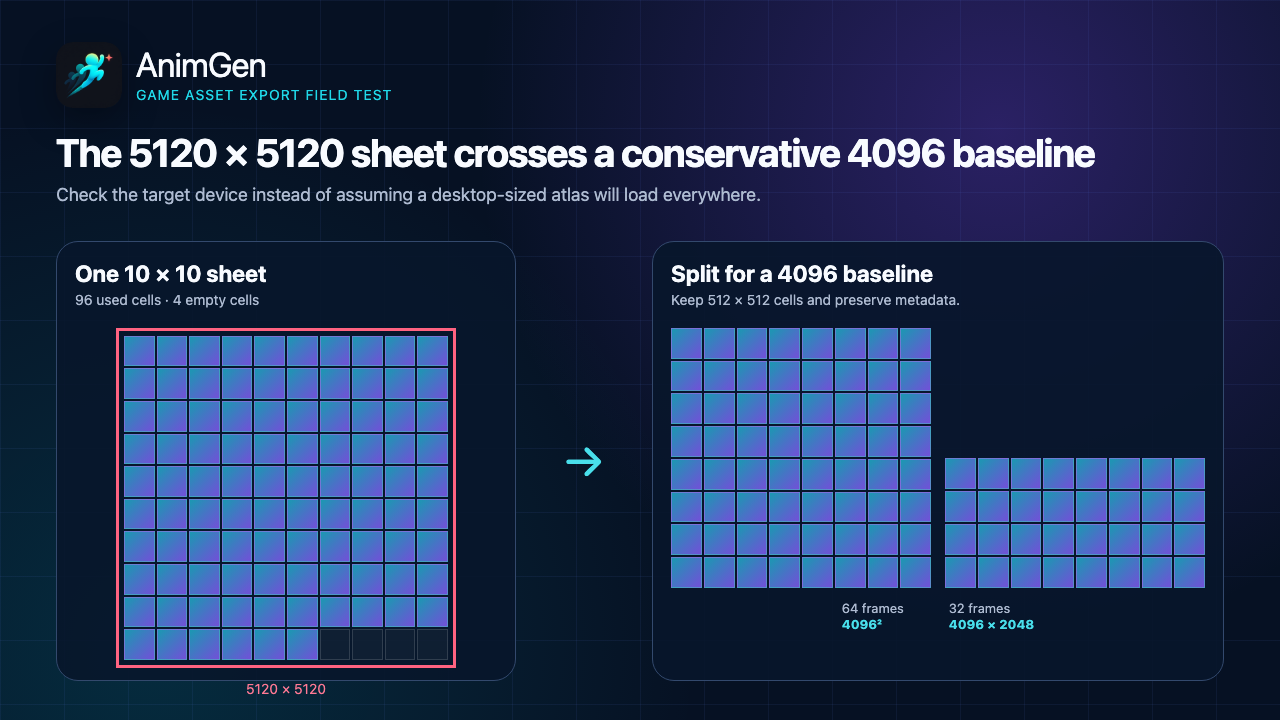
Godot's current texture-size guidance recommends avoiding textures above 4096 × 4096 for broad platform compatibility and notes that mobile GPUs are typically limited to that size. MDN's WebGL best practices similarly treats 4096 as a broadly available baseline while warning that a desktop may support much larger textures.
The number is a compatibility baseline, not a universal ceiling. Unity exposes the target hardware limit through SystemInfo.maxTextureSize, and WebGL can query its active context:
const maxTextureSize = gl.getParameter(gl.MAX_TEXTURE_SIZE);
For this exact 96-frame sample, keeping 512 × 512 cells while staying at or below 4096 can produce:
- one 8 × 8 sheet containing 64 frames at 4096 × 4096;
- one 8 × 4 sheet containing 32 frames at 4096 × 2048.
The metadata must then identify which texture contains each frame. Do not simply resize a 5120-pixel atlas and keep the old 512-pixel rectangles: that changes the cell size and invalidates the coordinates. Other valid options are exporting smaller frame canvases, selecting fewer frames, or using an engine pack that applies a target-aware layout.
What the metadata contributes
A bare sprite sheet does not explain how to play itself. The consumer needs at least the frame rectangles and ordering. Depending on the game, it may also need duration, animation names, loop behavior, source canvas, pivot, offsets, and texture filenames.
The public JSON used here provides:
- keys from
frame_0000.pngthroughframe_0095.png; - the
x,y,w, andhrectangle for every frame; - source and sprite-source sizes;
- a 42 ms integer duration on each frame;
- the
tactician_slashtag covering frames 0–95; - sheet size and RGBA8888 format.
The 42 ms value is an integer approximation of 24 FPS. If exact timeline synchronization matters, use the authoritative FPS or duration information from the export manifest rather than assuming a rounded per-frame integer is mathematically exact over a long sequence.
The PNG ZIP has meaningful filenames and a README that records 24 FPS, fixed canvas alignment, and a recommended bottom-center pivot. The PNG files themselves do not embed animation order, FPS, loop behavior, or gameplay state. Keep that sidecar information with the sequence.
This is why “sprite sheet versus PNG sequence” is not only an image-format decision. It is also a metadata decision.
Sprite sheet and texture atlas are related, not always identical
The terms are often used interchangeably, but a useful distinction is:
- a sprite sheet commonly uses a predictable strip or grid of animation frames;
- a texture atlas may combine unrelated sprites, trim transparent margins, rotate regions, and pack irregular rectangles to save space.
This test uses a regular sprite sheet. Frames are not trimmed or rotated, so each frame keeps the same 512 × 512 canvas. That wastes some transparent pixels, but it also makes frame-to-frame alignment and the bottom-center pivot straightforward.
A tighter atlas can reduce empty space, but the importer must honor source-size offsets, trimming, rotation, padding, and edge extrusion. If those fields are ignored, a character can jump around, sample a neighboring cell, or develop visible seams. Choose the most compact structure your real importer can reproduce correctly—not the most compact screenshot.
When a sprite sheet is the better choice
Choose a sprite sheet plus JSON or an engine pack when:
- the frames are intended for a real-time 2D runtime;
- the atlas stays within the tested texture limit;
- the importer understands the supplied rectangles and timing;
- the animation's frames are usually loaded and used together;
- sharing one texture helps the engine's batching and asset-management strategy;
- you want one package that is harder to separate or reorder accidentally.
For Godot, our separate Godot 4 import field test validates a runtime-oriented package with smaller cells, SpriteFrames resources, timing, pivot, and actual playback. That package is deliberately not added to the size table above because it uses different 96 × 96 frame dimensions.
When a PNG sequence is the better choice
Choose a PNG sequence when:
- an artist needs to retouch or replace individual frames;
- a compositor, encoder, or custom pipeline expects numbered images;
- you want a lossless source from which to derive WebM, ProRes, sheets, or engine packages;
- the whole animation would exceed a safe texture dimension;
- your runtime can load only the frames or actions needed for the current scene;
- you are diagnosing whether an artifact came from source pixels, packing, importing, filtering, or playback.
Independent files are also easier to compare in source control when only one frame changes. The downside is that names, timing, canvas, and pivot must remain synchronized with the images, and some engines will repack them during import anyway.
Video editing and web delivery use a different set of criteria. Our WebM Alpha, ProRes 4444, and PNG sequence comparison tests those delivery choices with the same source animation.
A practical export workflow
For a game project, a resilient workflow is:
- Select and review the useful animation range before packaging it.
- Export independent PNG frames as the inspection or production source.
- Confirm Alpha, fixed canvas alignment, frame order, FPS, and pivot.
- Choose the target platform's maximum texture size and output resolution.
- Pack one sheet, several sheets, or an engine-specific package for that target.
- Import the package and verify timing, filtering, edges, pivot, and loop endpoints in a small scene.
- Preserve the frame sequence, JSON, manifest, and tested runtime package as distinct artifacts.
AnimGen's sprite sheet maker can start from generated motion or a supported video, let you select the useful range and frame count, and export PNG frames, a sprite sheet with JSON, or engine packages. The output-format reference lists the exact deliverables, while current pricing and export access remains the source of truth for free and paid format entitlements.
Use a PNG sequence when people or tools need independent frames. Use a sprite sheet when a tested runtime benefits from a shared texture and reliable metadata. Keep both when they serve different stages of the same production pipeline.