AI animated emote maker
Make animated emotes with AI
Upload the emote or character art you already have and describe a small motion: a wave, a nod, a laugh. AnimGen AI animates it, you keep the part that loops, and you export a transparent GIF to resize for Twitch and Discord.
Real output
Four animated emotes, each made from one image
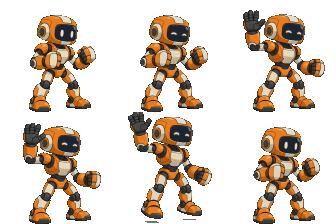
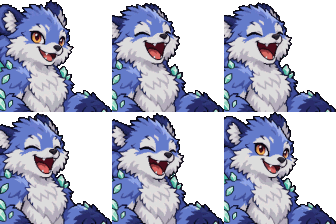
Each emote started from one still image and one 4-second Seedance 2.0 Fast generation at 480p, 36 credits. The loop was picked in AnimGen, exported as a transparent GIF, and resized with the free Emote Resizer. The small images are the actual Twitch files.
Wave
58 frames · 3.87 s loop
Twitch 112 px: 229 KB · Discord 128 px: 251 KB
Input image
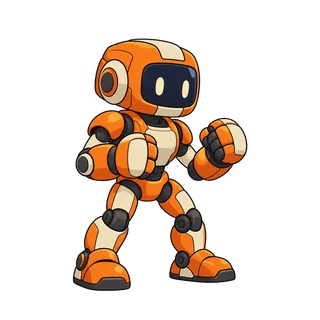
Actual size: 112, 56, and 28 px


Laugh
57 frames · 3.8 s loop
Twitch 112 px: 300 KB · Discord 128 px: 183 KB
Input image
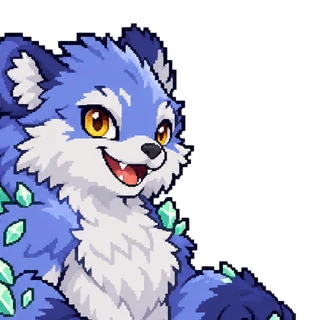
Actual size: 112, 56, and 28 px


Wing flutter
58 frames · 3.87 s loop
Twitch 112 px: 265 KB · Discord 128 px: 254 KB
Input image

Actual size: 112, 56, and 28 px



Nod
56 frames · 3.73 s loop
Twitch 112 px: 298 KB · Discord 128 px: 231 KB
Input image
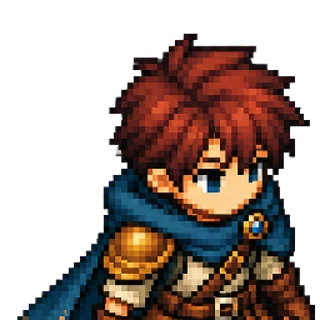
Actual size: 112, 56, and 28 px



How it works
From a still emote to an animated one
You describe the motion, the model generates it, and you choose the frames that loop.
- 1
Upload your emote image
Use the art you already have: a face, a bust, or a small full-body character. A PNG with a transparent background works best.
- 2
Describe one small motion
Name one action, such as wave, nod, laugh, or bounce, and ask for it to end in the starting pose so it can loop.
- 3
Pick the loop
Step through the frames and keep the range where the end meets the start. One to two seconds is enough for most emotes.
- 4
Export and resize
Export a transparent GIF, then open it in the Emote Resizer to get the 112, 56, and 28 px files for Twitch and the 128 px file for Discord.
Sizes and limits
What Twitch and Discord accept
Both platforms take animated emotes as GIFs. The Emote Resizer checks every file against these limits and reduces colors or frames when a file is too large.
| Platform | Format and size | Limit |
|---|---|---|
| Twitch animated emote | GIF at 112, 56, and 28 px | 512 KB per file when you upload the three sizes yourself; at most 60 frames |
| Discord animated emoji | GIF at 128 × 128 px | Under 256 KB |
Checked against the Twitch and Discord help pages on November 11, 2026.
See every size in the Emote ResizerExport
From preview to an emote file
Free generation and preview
- Generate clips with welcome credits, no card required
- Preview every clip and pick the loop
- Download access is shown in the studio
With a subscription or credit pack
- Transparent GIF, PNG frames, and WebM Alpha
- Sprite sheets and engine packs if the same character goes into a game
- Commercial use of what you export
Better results
What we learned from testing emotes
- Leave empty space around the art when the motion is big, or add it with Expand canvas. The Emote Resizer trims the space again, so the emote doesn't get smaller.
- Use a bust or a head shot for nods, laughs, and other face actions. They are hard to see on a full-body character at 112 px.
- Ask for one small action that returns to the starting pose, so the end of the loop meets the start.
- Keep Discord loops near 2 seconds. In our tests every 2-second loop fit under 256 KB at full frame rate; 4-second loops needed fewer colors or half the frames.
- Look at the 28 px version before you upload. Details that read at 112 px can disappear at that size.

No margin: the wings leave the frame
With a margin: the whole flutter fits
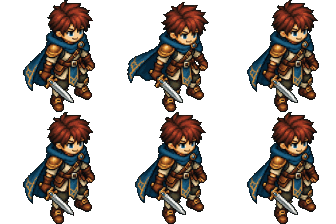
Full body: the nod is hard to see
Bust: the nod reads clearly
What it doesn't do
- It doesn't make an emote from a text prompt; start from your own image.
- It doesn't lip-sync or animate from audio.
- Light effects such as a glow or a shine sweep don't come through a transparent export cleanly; in our tests they turned into colored smudges. Animate the art itself.
- It doesn't upload to Twitch or Discord. Who can add animated emotes, and how many, is set by each platform.
- Results vary with the image and the prompt, so review each preview before you export.
Animated emote questions
How do I make an animated emote?
Upload your emote image, describe one small motion, and generate a preview. Keep the part that loops, export a transparent GIF, and resize it to the platform's sizes with the Emote Resizer.
What size is an animated Twitch emote?
Twitch takes animated emotes as GIFs at 112, 56, and 28 px. When you upload the three sizes yourself, each file can be up to 512 KB and the animation can have at most 60 frames.
What size is an animated Discord emoji?
128 × 128 px and under 256 KB, as a GIF. In our tests, loops of about 2 seconds fit without dropping frames.
Can I make animated emotes for free?
After verification, eligible new accounts receive welcome credits, valid for 7 days. Generating and previewing animations is free; download access is shown in the studio. The Emote Resizer is free and needs no account.
Can I animate an emote I already have?
Yes. Start from the original art rather than the 112 px file: the animation is generated at 480p or higher, so a larger source keeps more detail.
Will the background be transparent?
Yes. Upload a PNG with a transparent background and export a transparent GIF. Check it on dark and light chat backgrounds; the Emote Resizer shows both.
Can AnimGen make my emote talk or lip-sync?
No. AnimGen generates motion from an image and a text prompt. It doesn't sync a mouth to audio.
Can I use the emotes commercially?
Subscriptions and credit packs include commercial use. The free tier does not.
Related workflows
Bring your emote to life
Create an account, upload your emote image, and generate your first motion preview.
Animate my emote