In this guide
You have a character image and need three moves for a game: a fighting idle, a run and a punch. Ludo.ai's Sprite Generator and AnimGen can both start from that image and a written motion prompt. The useful comparison is what happens after generation: how the character moves, which frames you keep and what it costs to get those actions into your project.
We tried both with the same orange robot. Ludo produced a usable idle and a complete punch with little preparation. AnimGen gave us a clearer running stride and a longer punch sequence we could tighten by removing held frames. At the entry-level monthly prices, AnimGen also had a lower generation cost for this set.
We're the AnimGen team. These are the preserved outputs from our October 17–18, 2026 test, with one generation per action in each tool. Prices and current product documentation were checked again on November 4. The six-tool comparison covers the wider test; this article follows the robot through two workflows.
One input, the same three motion prompts
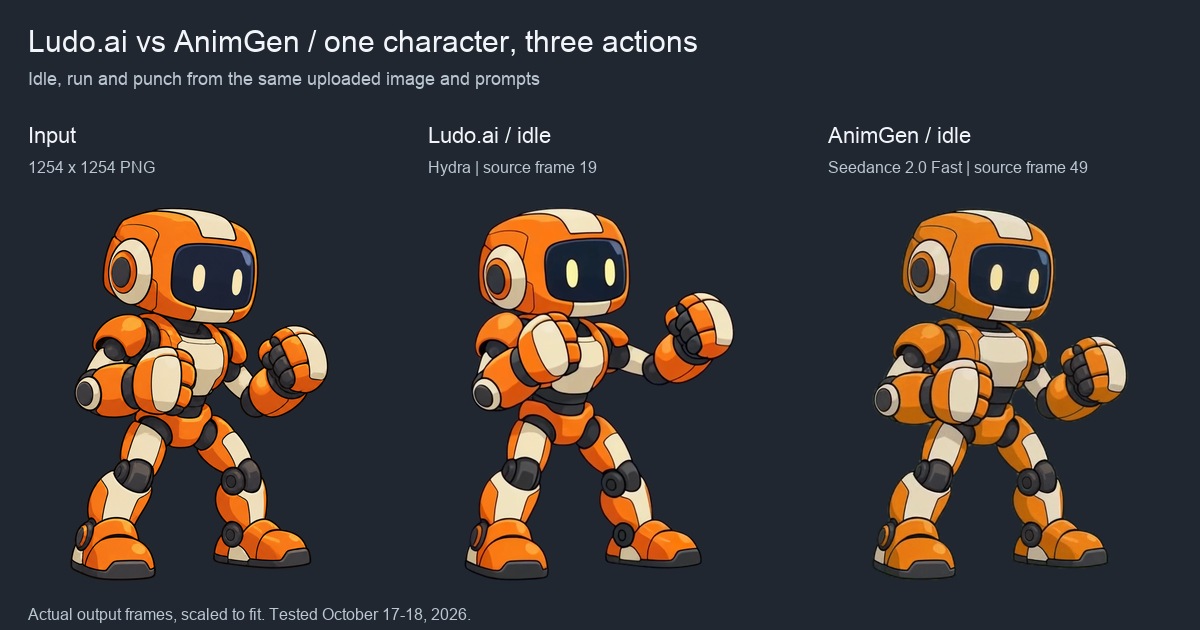
Both tools received the same 1254 × 1254 PNG with transparency. We uploaded the artwork directly, kept the same camera-angle instructions and requested an idle, a run in place and one straight punch followed by a return to guard.
Ludo used Hydra, with a maximum duration of three seconds, 36 frames, Auto animation margin and Max sprite size. Loop Animation was enabled for idle and run. AnimGen used Seedance 2.0 Fast, four seconds, 480p and Alpha Key, with the adaptive aspect ratio and no canvas expansion in this batch.
| Setting or delivered file | Ludo.ai | AnimGen |
|---|---|---|
| Generation request | Hydra, up to 3 s, 36 frames | Seedance 2.0 Fast, 4 s, 480p |
| Exported frames per action | 36 | 97 |
| Actual idle / run duration | 2.124 s / 2.124 s | 4.042 s / 4.042 s |
| Actual punch duration | 2.700 s | 4.042 s |
| Recorded generation charge | 9 credits per action | 36 credits per action |
| Files inspected | Transparent PNG sheet and JSON | Transparent PNG sheet and JSON |
The durations come from the downloaded JSON, rather than the requested length. Ludo's idle and run use 59 ms per frame; its punch uses 75 ms. AnimGen's 24 FPS export alternates 41 and 42 ms. These are the settings and files from this test, not each product's maximum capability.
Idle: both preserve a recognizable guard stance
Ludo keeps the feet planted, adds breathing and a blink, and retains the raised fists. There is a small shift in the viewing angle, but the character remains recognizable. This was one of its stronger results in the original test.
AnimGen also keeps the feet in place and preserves the costume and proportions. The longer sequence gives us a restrained breathing idle. For this action, either export is a reasonable starting point; a frame-count advantage alone would not decide which belongs in a game.
Each comparison uses a fixed crop and scale for the entire source clip. The backgrounds are editorial backdrops, composited behind transparent PNGs. We preserve the JSON timing in a 60 FPS comparison video without generating any intermediate poses.
Running: a short-stride jog and a more extended cycle
Ludo's result reads as a slow jog or march. The legs alternate, but the stride stays short and the upper body turns during the movement. A game with a compact, stylized jog could use it. A character that must sprint across a scene needs a different rhythm.
AnimGen produces more extended alternating strides after the standing start. The full clip still needs inspection: later frames contain a faint green or ghosted foot, visible around frame 52. We selected an earlier cycle, leaving the source pixels unchanged.
Speeding up Ludo's selection makes the jog more responsive, but it keeps the short-stride style. AnimGen is the closer fit for the running action we wanted. Its selected loop still has some foot-shape variation; choosing a range does not repair the drawing inside a frame.
When trying either result in a game, adjust movement speed against the feet. The playable character example shows how a convincing cycle can still slide if the scene movement and animation timing disagree.
Punching: Ludo arrives complete; AnimGen benefits from a tighter edit
Ludo delivered a readable punch with a complete return to guard. Its extended pose lasts long enough to give the action a deliberate pace. We retained the whole sequence in the original usability review.
AnimGen's four-second result contains more waiting than we want for a single attack input. We kept frames 25–34 and 64–78, removing the surrounding idle and the middle hold. Those 25 retained frames make a 1.042-second attack, at the original playback speed.
This is the editing choice that matters in AnimGen: a generated clip can contain the movement you need, while its original pacing feels slow under player control. Selecting frames lets you keep the approach, strike and recovery and shorten the pause between them. The sword attack example uses the same approach.
Ludo's Adjust Sprite Sheet can change frame count, size and loop settings without another generation charge. Its AI Edit Animation mode re-renders the result and uses credits. For our AnimGen punch, we selected the exact source frames we wanted to keep. Ludo Sprite Generator documentation
Transparent frames and the next tool in the workflow
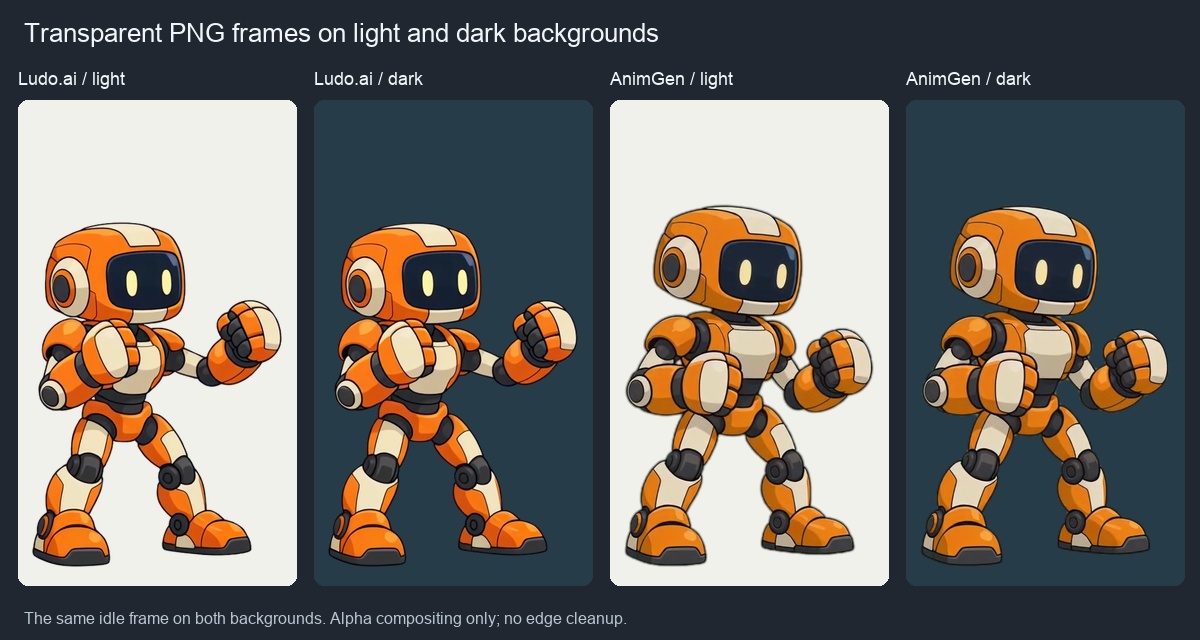
Both idle exports have usable transparent edges against these backgrounds. Ludo's clean sheet was downloaded after upgrading the account; we did not regenerate the animation. No edge cleanup was applied to either side of this image.
We also loaded the selected robot sequences into our comparison test scene in Godot 4.7.2, using an atlas adapter for the PNG and JSON files. Playback and frame regions passed the checks. That tells us the files can be read by the scene; the compact Ludo jog still needs a game whose movement style fits it.
For a project already built around PNG sheets and JSON, both outputs fit that workflow. AnimGen additionally offers engine export packages, transparent WebM and ProRes 4444 under paid access. Those formats are useful when the same character also needs to appear on a website or in a video. AnimGen export access and pricing
What these three actions cost in dollars
One Ludo credit and one AnimGen credit buy different amounts of work. The robot used 27 Ludo credits or 108 AnimGen credits for three generations, with no extra credit charge for the inspected exports. Here is the cost at the listed rates, assuming the purchased allowance is used.
| Purchase option | Payment and included credits | Cost of one tested generation | Cost of all three |
|---|---|---|---|
| Ludo Indie, monthly | $20/month, 250 credits | $0.72 | $2.16 |
| Ludo Indie, annual | $180 upfront/year, 3,000 credits | $0.54 | $1.62 |
| Ludo Pro, annual | $420 upfront/year, 12,000 credits | About $0.32 | About $0.95 |
| AnimGen Basic, monthly | $9.99/month, 1,100 credits | About $0.33 | About $0.98 |
| AnimGen Small pack | $6.99 once, 500 credits | About $0.50 | About $1.51 |
For example, AnimGen Basic is 36 × $9.99 ÷ 1,100 ≈ $0.33 per generation. Ludo Indie monthly is 9 × $20 ÷ 250 = $0.72. These are allocated credit costs, not amounts you can pay separately for a single animation. Ludo's idle used trial credits during our test; the table applies the same paid rate to all three actions for comparison. Sources: Ludo monthly plan documentation, Ludo pricing, AnimGen pricing.
The lower upfront payment is useful for a small project. AnimGen's $6.99 pack includes 90 days of access to all export formats, with 200 MB of storage. Basic raises storage to 5 GB. Ludo's current top-up packs are available to paid subscribers; its annual Pro rate can make a generation slightly cheaper than AnimGen Basic when you use the larger allowance. Ludo also offers cheaper Forge models, which we did not test in this robot set.
Usability changes the arithmetic. Ludo gave us two directly usable actions, plus a jog that was borderline for our intended run. If that jog fits your game, the monthly Indie allocation is $0.72 per action. If you reject it, the same $2.16 produced two usable actions, or $1.08 each. AnimGen gave us one direct idle and two actions after selection, about $0.33 each at Basic rates. Editing time was not measured and is not included. Neither set needed a paid retry in this test.
Choose around the artwork and the motion you need
Ludo is worth testing if you want sprite creation and animation within a broader game-asset toolset. Its current Sprite Generator supports keyframes, reference-video motion and presets alongside text prompts. Those are additional ways to guide a difficult action; the videos in this article test the shared image-plus-text route. Ludo Sprite Generator features
AnimGen is a useful Ludo.ai alternative when you already have the artwork, want continuous motion to select from and need transparent exports in several formats. In this robot set, its running stride was closer to our request, and we could shorten the punch without another generation. The low-cost one-time pack also makes it practical to finish a few assets without starting a subscription.
Try your own character with one idle and the action that is hardest to get right. In AnimGen's image-to-animation workflow, review the full result, select the useful frames, then test their timing where the character will actually move.